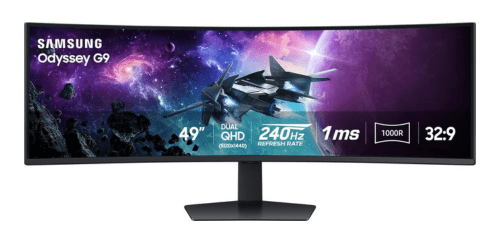
Samsung Odyssey G9 comes with an expansive 49-inch super-ultrawide curved display, a blazing-fast 240Hz refresh rate, and immersive 1000R curvature designed for high-end gaming and productivity. If you are looking for a perfect balance between immersive visuals, extreme gaming performance, and futuristic design, the Samsung Odyssey G9 stands out as a powerful choice in the premium gaming monitor category.
What Samsung Odyssey G9 Offer?
- The Samsung Odyssey G9 has a 49-inch Dual QHD 5120 × 1440 display for creating an ultra-wide workspace to run multiple applications side-by-side without a dual-monitor setup.
- Samsung Odyssey G9 has a 240Hz refresh rate for delivering extremely smooth motion and fluid gameplay to reduce motion blur during fast-paced gaming scenes.
- It has a 1ms response time for minimizing ghosting and motion artifacts, ensuring clearer visuals during rapid camera movements and competitive gameplay.
- The Samsung Odyssey G9 features a 1000R curved screen to match the natural curve of the human eye, enhancing immersion and reducing eye strain during long sessions.
- Samsung Odyssey G9 features QLED panel technology to deliver richer colors, deeper contrast, and brighter highlights that enhance both gaming and entertainment visuals.
- It has HDR1000 support for displaying brighter highlights and deeper shadows to create a more dynamic and realistic viewing experience in HDR content.
- The Samsung Odyssey G9 has NVIDIA G-SYNC and AMD FreeSync Premium Pro compatibility to synchronize the monitor’s refresh rate with the graphics card and reduce screen tearing and stuttering.
- Samsung Odyssey G9 has a 32:9 super-ultrawide aspect ratio to expand the field of view in games and provide a larger timeline workspace for video editing and productivity tasks.
- It has multiple connectivity options including DisplayPort, HDMI, and USB ports for easily connecting gaming PCs, consoles, and additional accessories in a single setup.
- Samsung Odyssey G9 has Infinity Core RGB lighting on the rear panel for adding customizable ambient lighting that enhances the visual appeal of a gaming desk setup.
Pros & Cons
- Extremely immersive 49-inch super-ultrawide display
Very smooth 240Hz refresh rate for competitive gaming
1000R curvature improves immersion and viewing comfort
Bright QLED panel with strong HDR performance
Excellent for multitasking and productivity workflows
Premium futuristic design with RGB lighting
Strong compatibility with modern GPUs and sync technologies
- Large size requires significant desk space
Premium price compared to standard gaming monitors
Requires powerful GPU for optimal performance at full resolution
Comparison
| Feature | Samsung Odyssey G9 | Samsung Odyssey Neo G9 | LG 49GR85DC-B |
| Display Size | 49 inches | 49 inches | 49 inches |
| Screen Curvature | 1000R | 1000R | 1000R |
| Panel Type | QLED VA | Mini LED VA | VA |
| Resolution | 5120 × 1440 | 5120 × 1440 | 5120 × 1440 |
| Aspect Ratio | 32:9 | 32:9 | 32:9 |
| Refresh Rate | 240 Hz | 240 Hz | 240 Hz |
| Response Time | 1 ms | 1 ms | 1 ms |
| HDR Standard | HDR1000 | HDR2000 | HDR600 |
| Peak Brightness | 1000 nits | 2000 nits | 1000 nits |
| Color Depth | 10-bit | 10-bit | 10-bit |
| Connectivity | 1× DisplayPort 1.4, 1× HDMI 2.0, 2× USB | 1× DisplayPort 1.4, 2× HDMI 2.1, 2× USB | 1× DisplayPort 1.4, 2× HDMI 2.1 |
| Adaptive Sync | G-SYNC Compatible, FreeSync Premium Pro | G-SYNC Compatible, FreeSync Premium Pro | FreeSync Premium Pro |
| Weight | 16.7 kg | 18.0 kg | 15.2 kg |
| Price | Check Odyssey G9 Price | Check Odyssey G9 Price | Check LG 49GR85DC Price |
FAQ
Is the Samsung Odyssey G9 good for gaming? Can the Samsung Odyssey G9 replace a dual-monitor setup? Does the Samsung Odyssey G9 support NVIDIA G-SYNC? Is the Samsung Odyssey G9 suitable for productivity work? What graphics card is recommended for the Samsung Odyssey G9? Does the Samsung Odyssey G9 support HDR content? Is the Samsung Odyssey G9 good for console gaming? How curved is the Samsung Odyssey G9 display? Does the Samsung Odyssey G9 have built-in speakers? Can the Samsung Odyssey G9 be wall mounted? Is the Samsung Odyssey G9 good for video editing? Does the Samsung Odyssey G9 support picture-by-picture mode? Is the Samsung Odyssey G9 comfortable for long sessions? How much desk space does the Samsung Odyssey G9 require? Who should buy the Samsung Odyssey G9? |