Samsung Galaxy Book 4 comes with a sleek aluminum design, the latest Intel Core processors, and a vibrant Full HD display that balances portability with everyday performance. If you are looking for a well-rounded Windows laptop that combines modern hardware, reliable battery life, and seamless Galaxy ecosystem integration, Samsung Galaxy Book 4 stands out as a practical and innovative choice for students, professionals, and remote workers alike.
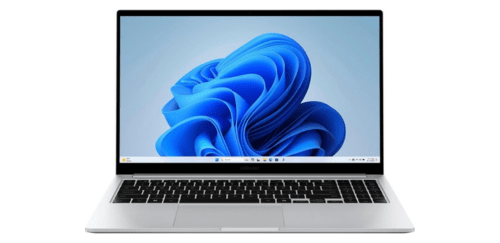
What Samsung Galaxy Book 4 Offer?
- The Samsung Galaxy Book 4 features Intel Core 7 processor for smooth multitasking, faster application launches, and consistent performance during demanding workloads like large spreadsheets and content creation.
- Samsung Galaxy Book 4 includes Intel Iris Xe graphics for handling high-resolution streaming, casual gaming, and light creative tasks without requiring a dedicated graphics card.
- It comes with up to 16GB LPDDR4x RAM for seamless switching between multiple apps, browser tabs, and video conferencing platforms without noticeable slowdowns.
- The Samsung Galaxy Book 4 supports up to 512GB NVMe SSD storage for rapid boot times, quick file transfers, and responsive overall system performance.
- Samsung Galaxy Book 4 features a 15.6-inch Full HD 1920 × 1080 display for sharp text clarity, comfortable document editing, and immersive media streaming.
- It has a 54Wh battery for extended daily productivity, reducing the need to frequently recharge during work, travel, or study sessions.
- The Samsung Galaxy Book 4 supports Wi-Fi 6 and Bluetooth 5.2 for stable high-speed internet connectivity and reliable pairing with wireless accessories such as headphones and mice.
- Samsung Galaxy Book 4 includes multiple USB-C, USB-A, HDMI, and microSD ports for flexible connectivity with external monitors, storage devices, and peripherals without relying on extra adapters.
- It integrates with Samsung Galaxy ecosystem features like Quick Share and Multi Control for effortless file sharing and cross-device productivity between compatible smartphones and tablets.
Pros & Cons
- Lightweight aluminum design suitable for travel and daily commuting
Intel Core processors provide stable multitasking performance
Full HD display ensures clear text and media playback
Strong integration with Samsung Galaxy ecosystem devices
Multiple ports reduce dependency on external adapters
- Not designed for high-end gaming or intensive 3D rendering
Display refresh rate limited to 60Hz
Comparison
| Feature | Samsung Galaxy Book 4 | Dell Inspiron 15 | HP Pavilion 15 |
| Processor | Intel Core 7 150U | Intel Core i7-1355U | Intel Core i7-1355U |
| RAM | 16GB LPDDR4x | 16GB DDR4 | 16GB DDR4 |
| Storage | 512GB NVMe SSD | 512GB NVMe SSD | 512GB NVMe SSD |
| Graphics | Intel Iris Xe | Intel Iris Xe | Intel Iris Xe |
| Display Size | 15.6 inches | 15.6 inches | 15.6 inches |
| Resolution | 1920 × 1080 | 1920 × 1080 | 1920 × 1080 |
| Screen Type | LCD | LCD | IPS LCD |
| Refresh Rate | 60Hz | 120Hz | 60Hz |
| Webcam | 720p HD | 720p HD | 720p HD |
| Battery Capacity | 54Wh | 54Wh | 41Wh |
| Battery Life | Up to 12 hours | Up to 10 hours | Up to 9 hours |
| Connectivity | Wi-Fi 6, Bluetooth 5.2 | Wi-Fi 6, Bluetooth 5.2 | Wi-Fi 6, Bluetooth 5.2 |
| USB Ports | 2 × USB-C, 2 × USB-A | 1 × USB-C, 2 × USB-A | 1 × USB-C, 2 × USB-A |
| HDMI | 1 × HDMI | 1 × HDMI | 1 × HDMI |
| Weight | 1.55 kg | 1.65 kg | 1.74 kg |
| Price | Check Book 4 Price | Check Dell 15 Price | Check HP Pavilion 15 Price |
FAQ
Is Samsung Galaxy Book 4 good for students? Can Samsung Galaxy Book 4 handle video editing? How long does the battery last on Samsung Galaxy Book 4? Does Samsung Galaxy Book 4 support fast charging? Is the display suitable for watching movies? Does Samsung Galaxy Book 4 support external monitors? Is Samsung Galaxy Book 4 compatible with Samsung smartphones? Can Samsung Galaxy Book 4 run Microsoft Office smoothly? Is Samsung Galaxy Book 4 good for remote work? Does Samsung Galaxy Book 4 support expandable storage? How portable is Samsung Galaxy Book 4? Is the keyboard comfortable for long typing sessions? Does Samsung Galaxy Book 4 overheat during heavy use? Is Samsung Galaxy Book 4 suitable for gaming? Who should buy Samsung Galaxy Book 4? |