Netgear CM600 & Netgear CM500 share many similarities, but there are also important differences, such as quality, performance, features, design, and connectivity. If you want the best one between them, I Would recommend the Netgear CM600 rather than the Netgear CM500.
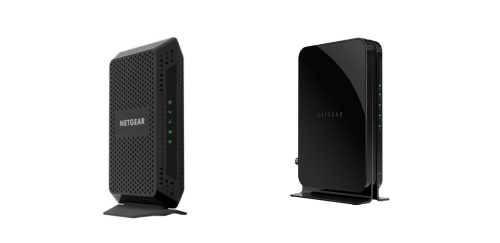
Why Do I Recommend The Netgear CM600?
- The Netgear CM600 supports 24×8 channel bonding for higher aggregate bandwidth capacity and more stable throughput during peak usage hours, whereas the Netgear CM500 supports 16×4 channel bonding.
- Netgear CM600 supports a maximum 960 Mbps download speed for handling high-tier cable internet plans without bottlenecks, while the Netgear CM500 supports up to 680 Mbps.
- It supports 8 upstream channels for improved upload bandwidth during video conferencing, cloud backups, and large file transfers, whereas the Netgear CM500 supports 4 upstream channels.
- The Netgear CM600 supports higher 300 Mbps upstream capacity for maintaining stable performance when multiple devices upload simultaneously, while the Netgear CM500 supports up to 150 Mbps upstream.
- Netgear CM600 features greater downstream channel density for maintaining consistent speeds under network congestion conditions, while the Netgear CM500 features fewer bonded downstream channels.
- It supports ISP plans approaching 1 Gbps for compatibility with advanced cable speed tiers, whereas the Netgear CM500 supports mid-tier plans below 700 Mbps.
- The Netgear CM600 includes a physical rear power button for controlled device restarts without unplugging the power adapter, while the Netgear CM500 does not include a dedicated power button.
- Netgear CM600 features higher theoretical total throughput capacity for maintaining performance across multiple high-bandwidth activities such as 4K streaming and online gaming, while the Netgear CM500 uses a lower overall channel bonding configuration.
Maybe the Netgear CM500 can make you comfortable because it’s a little bit cheaper than the Netgear CM600. But you have to compromise all the above-mentioned features. Now the Decision is Yours. I hope it was helpful to choose the right one.
Side-by-Side Comparison
| Feature | Netgear CM600 | Netgear CM500 |
| DOCSIS channel bonding | 24×8 | 16×4 |
| Bonded downstream channels | 24 | 16 |
| Bonded upstream channels | 8 | 4 |
| Max download speed rating | 960 Mbps | 680 Mbps |
| Max download speed rating | 0.96 Gbps | 0.68 Gbps |
| Flash | 8 MB NOR flash | 8 MB flash |
| Weight (kg) | 0.45 kg | 0.28 kg |
| Downstream LED scan state color | Blinking green | Blinking amber |
| Upstream LED scan state color | Blinking green | Blinking amber |
| Power button (back panel) | Yes | No |
| Price | Check Netgear CM600 Price | Check Netgear CM500 Price |
What Common Both Can Do?
- DOCSIS Standard: Both modems use DOCSIS 3.0 technology, which enables high-speed broadband over cable networks. This ensures compatibility with most modern cable ISP infrastructures and supports reliable data transmission.
- Backward Compatibility: Each model supports DOCSIS 2.0 backward compatibility. This allows them to function with older cable systems if necessary, ensuring flexibility during ISP transitions.
- Gigabit Ethernet Port: Both devices include a single 10/100/1000 Mbps Ethernet port. This allows direct connection to a router or computer with support for gigabit wired speeds.
- Ethernet Port Type: Each modem uses a standard RJ-45 Ethernet connector. This ensures universal compatibility with common Ethernet cables and networking equipment.
- IPv6 Support: Both modems support IPv6 addressing. This is important for long-term internet scalability and compatibility with modern network configurations.
- ISP Compatibility: Each modem is designed for use with major U.S. cable internet providers. This broad compatibility simplifies activation and deployment across different service areas.
- Cable Interface: Both units connect to the internet using a coaxial cable with an F-type connector. This is the standard physical interface for cable broadband connections.
- LED Status Indicators: Both modems feature LED lights for Power, Downstream, Upstream, Internet, and Ethernet activity. These indicators help users quickly diagnose connection status and troubleshoot issues.
- External Power Adapter: Each modem uses an external power supply. This keeps internal heat lower and allows easier replacement if the adapter fails.
- Standalone Cable Modem: Both devices function strictly as cable modems. They are intended to be paired with a separate WiFi router for wireless networking.
- No Built-in WiFi: Neither model includes integrated wireless functionality. This allows users to choose their own preferred router for customized network performance.
- No Built-in Router: Both lack NAT routing capabilities. This ensures they operate purely as modems without overlapping router features.
- Auto-Sensing Ethernet: Each modem automatically detects the speed of the connected Ethernet device. This ensures stable communication without manual configuration.
- Plug-and-Play Setup: Both models support simple ISP activation procedures. Users can connect the modem, contact their ISP, and complete activation without complex configuration steps.
- Vertical Stand Design: Each modem uses a vertical orientation for placement. This design minimizes desk footprint and promotes airflow.
- Vented Cooling Chassis: Both feature vented enclosures to dissipate internal heat. Proper ventilation helps maintain consistent performance during continuous operation.
- Retail Packaging Type: Each device is sold as a consumer retail cable modem. This allows customers to purchase and activate them independently rather than renting from an ISP.
Common Features
| Feature | Netgear CM600 | Netgear CM500 |
| DOCSIS Standard | DOCSIS 3.0 | DOCSIS 3.0 |
| Backward Compatibility | DOCSIS 2.0 | DOCSIS 2.0 |
| Gigabit Ethernet Port | 1 × 10/100/1000 Mbps | 1 × 10/100/1000 Mbps |
| Ethernet Port Type | RJ-45 | RJ-45 |
| IPv6 Support | Yes | Yes |
| ISP Compatibility | Major U.S. cable ISPs | Major U.S. cable ISPs |
| Cable Interface | Coaxial | Coaxial |
| LED Status Indicators | Power, Downstream, Upstream, Internet, Ethernet | Power, Downstream, Upstream, Internet, Ethernet |
| External Power Adapter | Yes | Yes |
| Standalone Cable Modem | Yes | Yes |
| No Built-in WiFi | Yes | Yes |
| No Built-in Router | Yes | Yes |
| Auto-Sensing Ethernet | Yes | Yes |
| Plug-and-Play Setup | Yes | Yes |
| Vertical Stand Design | Yes | Yes |
| Vented Cooling Chassis | Yes | Yes |
| Retail Packaging Type | Consumer retail modem | Consumer retail modem |
| Price | Check Netgear CM600 Price | Check Netgear CM500 Price |
FAQ
Is the Netgear CM600 faster than the Netgear CM500? Do both the Netgear CM600 and Netgear CM500 support DOCSIS 3.0? What is the channel bonding difference between the Netgear CM600 and Netgear CM500? Can the Netgear CM600 and Netgear CM500 work with gigabit internet plans? Do the Netgear CM600 and Netgear CM500 have built-in WiFi? How many Ethernet ports are available on both models? Are the Netgear CM600 and Netgear CM500 compatible with major cable ISPs? Do both modems support IPv6? Is there a physical power button on both devices? Do both modems use a coaxial cable connection? Are the Netgear CM600 and Netgear CM500 backward compatible with older DOCSIS versions? Do both models use LED indicators for status monitoring? Is there a difference in upstream speed capacity? Are both modems designed for vertical placement? Do both devices require an external power adapter? |