Motorola MB8611 & NETGEAR CM2000 share many similarities, but there are also important differences, such as quality, performance, features, design, and connectivity. If you want the best one between them, I Would recommend the Motorola MB8611 rather than the NETGEAR CM2000.
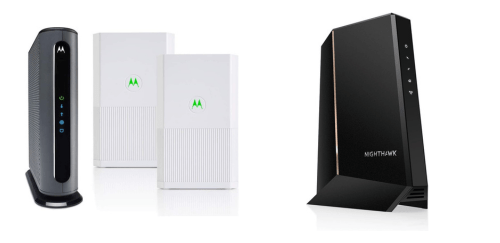
Why Do I Recommend The Motorola MB8611?
- The Motorola MB8611 has 800 Mbps maximum upstream speed for clearer visibility into high-upload performance planning on supported ISP tiers, while the NETGEAR CM2000 has lower upstream speed.
- Motorola MB8611 includes detailed SNMP v1/v2/v3 support for advanced network monitoring and compatibility with managed network environments, whereas the NETGEAR CM2000 does not publicly specify SNMP version details.
- It features a documented operating temperature range of 32°F to 104°F for predictable deployment in controlled indoor environments, while the NETGEAR CM2000 does not clearly publish an operating temperature range.
- The Motorola MB8611 comes with WPS and Reset physical buttons for quicker hardware-level interaction and recovery during troubleshooting, whereas the NETGEAR CM2000 documentation primarily lists a reset function without detailing additional front-facing control buttons.
- Motorola MB8611 supports 10/100/1000/2500 Mbps Ethernet speed modes to provide clear confirmation of backward compatibility with legacy networking equipment, whereas the NETGEAR CM2000 specification emphasizes auto-sensing 2.5 Gigabit Ethernet.
- It includes bundled accessories such as a Velcro cable tie for cleaner cable management during installation, whereas the NETGEAR CM2000 includes only the Ethernet cable, power adapter, and quick install guide.
- The Motorola MB8611 comes with a 2-year limited warranty for extended hardware protection and reduced replacement costs over a longer ownership period, whereas the NETGEAR CM2000 includes a 1-year limited warranty.
Maybe the NETGEAR CM2000 can make you comfortable because it’s a little bit cheaper than the Motorola MB8611. But you have to compromise all the above-mentioned features. Now the Decision is Yours. I hope it was helpful to choose the right one.
Side-by-Side Comparison
| Feature | Motorola MB8611 | NETGEAR CM2000 |
| Max downstream (rated) | 2,500 Mbps | 2.5 Gbps |
| Max upstream (rated) | 800 Mbps | Not specified |
| DOCSIS backward-compatibility list | DOCSIS 3.1 / 3.0 / 2.0 / 1.1 | DOCSIS 3.1 / 3.0 |
| Ethernet port speed modes (listed) | 10/100/1000/2500 Mbps | Auto-sensing 2.5Gbps Gigabit Ethernet |
| Buttons (listed) | WPS, Reset | Not specified |
| LED indicator detail (listed) | 5 front status LEDs + 2 Ethernet-port LEDs | Not specified |
| Network protocols list (listed) | IPv4, IPv6, TCP, UDP, ARP, ICMP, DHCP, FTP, TFTP, SNMP, HTTP | Not specified |
| SNMP versions (listed) | SNMP v1/v2/v3 | Not specified |
| Operating temperature (listed) | 32°F to 104°F | Not specified |
| Included accessories (listed) | Ethernet cable, power adapter, Velcro cable tie, quick start guide | Ethernet cable, power adapter, quick install guide |
| Price | Check Motorola MB8611 Price | Check NETGEAR CM2000 Price |
What Common Both Can Do?
- DOCSIS 3.1: Both modems support DOCSIS 3.1, enabling multi-gigabit download speeds and improved spectral efficiency compared to older standards. This ensures compatibility with high-speed cable internet plans offered by major ISPs.
- Backward Compatibility: Each modem supports DOCSIS 3.0 fallback, allowing operation on networks that have not fully transitioned to DOCSIS 3.1. This provides flexibility if the ISP infrastructure varies by region.
- 2.5 Gigabit Ethernet Port: Both devices include a single 2.5GbE LAN port, allowing connection to multi-gig routers or switches. This prevents a 1Gbps bottleneck when subscribing to internet plans above 1 Gbps.
- Single Multi-Gig Port: Each modem includes one Ethernet output, designed strictly for router connection rather than multiple direct wired clients. This keeps the devices optimized for bridge-mode deployment.
- Downstream OFDM Support: Both support OFDM channels under DOCSIS 3.1, which improves data efficiency and throughput over legacy QAM-only systems. This contributes to higher sustained download speeds.
- Upstream OFDMA Support: Each modem supports OFDMA for upstream traffic, improving upload performance and network efficiency. This is important for video calls, cloud backups, and content uploads.
- IPv4 and IPv6 Support: Both modems support dual-stack IPv4 and IPv6 networking. This ensures compatibility with modern network services and future internet infrastructure requirements.
- Bridge Mode Operation: Both units operate strictly as cable modems without routing functions. This allows users to pair them with dedicated routers for advanced network management.
- ISP Firmware Updates: Firmware updates are delivered through the internet service provider. This ensures compatibility, security updates, and performance optimizations are handled automatically.
- 32×8 Channel Bonding (DOCSIS 3.0 Mode): Each modem supports 32 downstream and 8 upstream channels in DOCSIS 3.0 mode. This ensures strong performance even on networks not fully transitioned to DOCSIS 3.1.
- Cable Internet Only Design: Neither device includes WiFi or built-in routing features. This simplifies setup for users who prefer standalone routers or mesh systems.
- LED Status Indicators: Both include front-facing LED indicators to display power, connectivity, and data activity. These provide quick troubleshooting visibility.
- Vertical Desktop Form Factor: Each modem uses an upright design for passive airflow and reduced desk footprint. This helps with thermal management during sustained high-speed transfers.
- Gigabit+ Plan Support: Both are engineered for internet service plans exceeding 1 Gbps. This makes them suitable for high-bandwidth households with streaming, gaming, and smart devices.
- SNMP Support: Both devices support SNMP for monitoring and diagnostics. This is beneficial for advanced users or ISP-level network management.
- DOCSIS Security (BPI+): Each modem implements DOCSIS BPI+ encryption for secure communication between modem and ISP headend. This protects transmitted data from interception.
- Single Coaxial Input: Both use one coaxial cable input for connection to the cable provider’s line. This maintains standard residential cable infrastructure compatibility.
- Auto Provisioning via ISP: Both modems activate and provision automatically once connected and registered with the ISP. This streamlines the installation process for end users.
Common Features
| Feature | Motorola MB8611 | NETGEAR CM2000 |
| DOCSIS Standard | DOCSIS 3.1 | DOCSIS 3.1 |
| Backward Compatibility | DOCSIS 3.0 | DOCSIS 3.0 |
| Max Ethernet Port Speed | 2.5 Gigabit Ethernet | 2.5 Gigabit Ethernet |
| Multi-Gig Port Count | 1 | 1 |
| Downstream OFDM Support | Yes | Yes |
| Upstream OFDMA Support | Yes | Yes |
| IPv4 Support | Yes | Yes |
| IPv6 Support | Yes | Yes |
| Bridge Mode Operation | Yes | Yes |
| ISP Firmware Updates | Yes | Yes |
| 32×8 DOCSIS 3.0 Channel Bonding | Yes | Yes |
| Cable Internet Only (No Router) | Yes | Yes |
| LED Status Indicators | Yes | Yes |
| Vertical Desktop Design | Yes | Yes |
| Broadband Gigabit+ Plan Support | Yes | Yes |
| SNMP Support | Yes | Yes |
| DOCSIS Security (BPI+) | Yes | Yes |
| Single Coaxial Input | Yes | Yes |
| Auto Provisioning via ISP | Yes | Yes |
| Price | Check Motorola MB8611 Price | Check NETGEAR CM2000 Price |
FAQ
Is the Motorola MB8611 compatible with the same ISPs as the NETGEAR CM2000? Do both modems support internet plans above 1 Gbps? Do these modems include built-in WiFi? Is there any difference in Ethernet connectivity between the two? Do both devices support DOCSIS 3.0 networks? Can these modems handle heavy gaming and streaming usage? How are firmware updates handled on these modems? Do the modems support IPv6 networking? Is bridge mode supported on both devices? Do both modems support advanced DOCSIS security features? Are the Motorola MB8611 and NETGEAR CM2000 suitable for business use? Is installation difficult for either modem? Do both models have status LED indicators? Can these modems reduce latency compared to older DOCSIS 3.0 models? Which modem is better for future-proofing a home network? |