iPad mini A17 Pro & Kobo Libra Colour share many similarities, but there are also important differences, such as quality, performance, features, design, and connectivity. If you want the best one between them, I Would recommend the iPad mini A17 Pro rather than the Kobo Libra Colour.
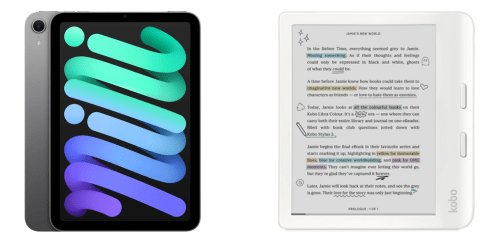
Why Do I Recommend The iPad mini A17 Pro?
- The iPad mini A17 Pro comes with the Apple A17 Pro chip for handling advanced multitasking, console-level gaming, and demanding creative applications without lag, while the Kobo Libra Colour uses a low-power eReader processor designed primarily for page rendering.
- iPad mini A17 Pro features an 8.3-inch 2266 × 1488 Liquid Retina display for displaying detailed graphics, full-color video, and high-resolution documents with precise scaling, whereas the Kobo Libra Colour uses a 7-inch E Ink Kaleido 3 display with lower color refresh capability.
- It supports full iPadOS app compatibility for running productivity suites, streaming platforms, and professional software tools in one device, while the Kobo Libra Colour uses Kobo OS limited to reading-focused applications.
- The iPad mini A17 Pro includes front and rear cameras for scanning documents, capturing photos, and participating in video calls directly from the device, whereas the Kobo Libra Colour has no built-in camera hardware.
- iPad mini A17 Pro supports optional 5G and LTE connectivity for accessing cloud services and streaming content without relying on Wi-Fi networks, while the Kobo Libra Colour supports Wi-Fi connectivity only.
- It comes with Apple Pencil support for pressure-sensitive drawing, precision handwriting, and advanced creative workflows in supported apps, while the Kobo Libra Colour supports a basic stylus mainly for annotations and simple notebooks.
- The iPad mini A17 Pro features stereo speakers for playing media, participating in video meetings, and consuming audio content without external devices, whereas the Kobo Libra Colour relies primarily on Bluetooth audio output.
- iPad mini A17 Pro includes up to 1 TB internal storage for storing large app libraries, high-resolution videos, and extensive document collections on the device, while the Kobo Libra Colour comes with 32 GB internal storage focused on ebook files.
Maybe the Kobo Libra Colour can make you comfortable because it’s a little bit cheaper than the iPad mini A17 Pro. But you have to compromise all the above-mentioned features. Now the Decision is Yours. I hope it was helpful to choose the right one.
Side-by-Side Comparison
| Feature | iPad mini A17 Pro | Kobo Libra Colour |
| Display type | Liquid Retina LCD | E Ink Kaleido 3 color |
| Display size | 8.3 inches | 7 inches |
| Resolution | 2266 × 1488 pixels | ~1680 × 1264 pixels |
| Pixel density | ~326 ppi | ~300 ppi |
| Refresh tech | 60 Hz | ePaper partial refresh |
| Touch layers | Multi-touch glass | Multi-touch eInk |
| Color gamut | Full RGB | Color eInk gamut |
| Backlight | LED backlight | Front light panel only |
| Battery capacity | ~20.1 Wh | ~8,000 mAh |
| Processor | Apple A17 Pro | eReader optimized SoC |
| RAM | ~8 GB | ~1 GB class |
| Storage options | 128, 256, 512, 1 TB | 32 GB |
| Cameras | Front + rear cameras | No camera |
| Microphones | Multi-mic array | No dedicated mic |
| Speakers | Stereo speakers | No speakers |
| Cellular connectivity | Optional 5G/LTE | Wi-Fi only |
| Wi-Fi standard | Wi-Fi 6E / 6 | Wi-Fi 5 class |
| Stylus support | Apple Pencil | Kobo Stylus |
| Device thickness | ~6.3 mm | ~7.8 mm |
| Operating system | iPadOS | Kobo OS |
| App ecosystem | Full App Store | Native reading apps only |
| Video playback | Supported | Not supported |
| Gaming support | Supported | Not supported |
| PDF zoom/refresh | Real-time UI | Slower ePaper refresh |
| Price | Check iPad mini A17 Pro Price | Check Kobo Libra Colour Price |
What Common Both Can Do?
- Touchscreen Input: Both devices use capacitive touchscreen technology, allowing users to navigate menus, select content, and interact directly with the display. This enables intuitive control without requiring external peripherals for basic operation.
- USB-C Port: Each device uses a USB-C charging port for power delivery and data transfer. This standard connector allows compatibility with modern cables and chargers.
- Bluetooth Connectivity: Both models include Bluetooth support for connecting wireless accessories. This allows pairing with headphones or stylus devices without cables.
- Wi-Fi Connectivity: Each device connects to Wi-Fi networks for downloading content and syncing data. Wireless connectivity is essential for accessing digital libraries and cloud services.
- Rechargeable Battery: Both products operate on built-in rechargeable batteries. This removes the need for disposable batteries and supports repeated charging cycles.
- Portable Form Factor: Each device is compact and designed for handheld use. Their size allows them to fit easily into bags or small cases for travel.
- Color Display Capability: Both devices support color output on their displays. This allows viewing of colored book covers, illustrations, and interface elements.
- Stylus Support: Each model supports a compatible stylus for writing or annotation. This enables digital note-taking and markup directly on supported documents.
- Internal Storage: Both devices include built-in storage for apps or digital books. This allows users to carry a personal library without needing external storage devices.
- Digital Book Support: Each device can display digital books in supported formats. This makes both suitable for reading ebooks and long-form documents.
- PDF File Support: Both models can open and display PDF documents. This is useful for reading manuals, textbooks, and work files.
- Front Lighting System: Each device includes lighting for visibility in low-light environments. This ensures the screen remains readable at night or indoors.
- On-Screen Keyboard: Both products feature a virtual keyboard displayed on the screen. This allows users to enter text for searches, notes, or login credentials.
- Cloud Sync Support: Each device supports syncing content through cloud-based services. This helps keep reading progress or files updated across sessions.
- Software Updates: Both products receive firmware or system updates. Updates provide security patches and feature enhancements over time.
- Lightweight Design: Each device is engineered for handheld comfort. Reduced weight supports extended reading or usage sessions.
- Multi-Language Interface: Both devices support multiple system languages. This allows users from different regions to navigate the interface comfortably.
Common Features
| Feature | iPad mini A17 Pro | Kobo Libra Colour |
| Touchscreen Input | Yes | Yes |
| USB-C Port | Yes | Yes |
| Bluetooth Connectivity | Yes | Yes |
| Wi-Fi Connectivity | Yes | Yes |
| Rechargeable Battery | Yes | Yes |
| Portable Form Factor | Yes | Yes |
| Color Display Capability | Yes | Yes |
| Stylus Support | Yes | Yes |
| Internal Storage | Yes | Yes |
| Digital Book Support | Yes | Yes |
| PDF File Support | Yes | Yes |
| Front Lighting System | Yes | Yes |
| On-Screen Keyboard | Yes | Yes |
| Cloud Sync Support | Yes | Yes |
| Software Updates | Yes | Yes |
| Lightweight Design | Yes | Yes |
| Multi-Language Interface | Yes | Yes |
| Price | Check iPad mini A17 Pro Price | Check Kobo Libra Colour Price |
FAQ
Is the iPad mini (A17 Pro) more powerful than the Kobo Libra Colour? Which device is better for long reading sessions? Can both devices handle PDF files? Do both models support stylus input? Is cellular connectivity available on both devices? Which device has a larger display? Do both devices use USB-C for charging? Can both devices install third-party apps? Which device supports video playback? Is storage expandable on either device? Do both devices support Bluetooth accessories? Which device is lighter? Are both devices suitable for note-taking? Do both devices have built-in cameras? Which device offers longer battery duration per charge cycle? |