The HP Envy x360 Notebook comes with a sleek convertible design, strong everyday performance, and long battery life that make it versatile for work, study, and entertainment. If you are looking for a balanced laptop that combines premium build quality, flexible usability, and reliable performance, the HP Envy x360 Notebook is a solid option in the modern 2-in-1 laptop category.
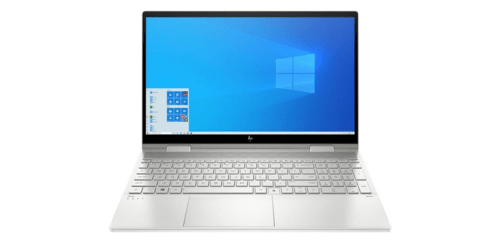
What HP Envy x360 Notebook Offer?
- The HP Envy x360 Notebook has an AMD Ryzen 5 7530U processor for smooth multitasking, faster application performance, and efficient everyday productivity.
- HP Envy x360 Notebook has a 1920 × 1080 Full HD IPS touchscreen display to deliver sharp visuals, vibrant colors, and responsive touch interaction for work, browsing, and streaming.
- It has a 360-degree convertible hinge for switching between laptop, tablet, tent, and stand modes to adapt to productivity, creative tasks, and entertainment.
- The HP Envy x360 Notebook has integrated AMD Radeon graphics for smooth video playback, casual gaming, and reliable performance in everyday graphics tasks.
- HP Envy x360 Notebook has 16GB DDR4 memory for running multiple applications, browser tabs, and productivity tools simultaneously without noticeable lag.
- It has a 512GB NVMe SSD for faster boot times, quicker file transfers, and instant application loading.
- The HP Envy x360 Notebook has Wi-Fi 6 connectivity for faster wireless speeds, lower network congestion, and more stable internet performance in busy environments.
- HP Envy x360 Notebook has a 51Wh battery to support up to 11 hours of usage without frequent charging.
- It has a precision touchpad and backlit keyboard for comfortable typing, accurate cursor control, and easier use in low-light environments.
- The HP Envy x360 Notebook has USB-C, USB-A, and HDMI ports for connecting external displays, storage devices, and accessories without relying heavily on adapters.
Pros & Cons
- Premium aluminum build that feels sturdy and durable
- Convertible 2-in-1 design that supports multiple usage modes
- Responsive Full HD touchscreen display
- Strong everyday performance with modern processors
- Long battery life suitable for mobile productivity
- Comfortable keyboard and large precision touchpad
- Modern connectivity including USB-C and Wi-Fi 6
- Integrated graphics limit heavy gaming performance
- Display refresh rate limited to 60 Hz
- No dedicated GPU for advanced creative workloads
- Stylus sometimes sold separately depending on configuration
Comparison
| Feature | HP Envy x360 Notebook | Lenovo Yoga 7i | Dell Inspiron 14 2-in-1 |
| Processor | AMD Ryzen 5 7530U | Intel Core i5-1340P | Intel Core i5-1335U |
| RAM | 16GB DDR4 | 16GB LPDDR5 | 16GB DDR4 |
| Storage | 512GB NVMe SSD | 512GB NVMe SSD | 512GB NVMe SSD |
| Display Size | 15.6 inches | 14 inches | 14 inches |
| Screen Type | IPS Touchscreen | IPS Touchscreen | IPS Touchscreen |
| Resolution | 1920 × 1080 | 1920 × 1200 | 1920 × 1200 |
| Refresh Rate | 60 Hz | 60 Hz | 60 Hz |
| Graphics | AMD Radeon Graphics | Intel Iris Xe Graphics | Intel Iris Xe Graphics |
| Battery Capacity | 51 Wh | 71 Wh | 54 Wh |
| Battery Life | 11 hours | 14 hours | 10 hours |
| USB Ports | 2 × USB-A, 1 × USB-C | 1 × USB-A, 2 × USB-C | 2 × USB-A, 1 × USB-C |
| HDMI | 1 × HDMI 2.1 | 1 × HDMI 1.4b | 1 × HDMI 1.4 |
| Wireless Connectivity | Wi-Fi 6, Bluetooth 5.3 | Wi-Fi 6E, Bluetooth 5.2 | Wi-Fi 6, Bluetooth 5.2 |
| Weight | 1,820 grams | 1,490 grams | 1,650 grams |
| Price | Check Envy x360 Price | Check Lenovo Yoga 7i Price | Check Dell Inspiron Price |
FAQ
Is the HP Envy x360 Notebook good for students and office work? Can the HP Envy x360 Notebook run professional software? Does the HP Envy x360 Notebook support a stylus? Is the HP Envy x360 Notebook good for watching movies and streaming? How long does the battery last on the HP Envy x360 Notebook? Does the HP Envy x360 Notebook support fast charging? Is the keyboard comfortable for long typing sessions? Can the HP Envy x360 Notebook connect to external monitors? Is the HP Envy x360 Notebook suitable for light gaming? Does the HP Envy x360 Notebook have good build quality? Is the HP Envy x360 Notebook easy to carry? Does the HP Envy x360 Notebook include modern connectivity options? Can the HP Envy x360 Notebook be used in tablet mode? Is the HP Envy x360 Notebook good for multitasking? Who should buy the HP Envy x360 Notebook? |