Elgato HD60 X & Elgato Game Capture Neo share many similarities, but there are also important differences, such as quality, performance, features, design, and connectivity. If you want the best one between them, I Would recommend the Elgato HD60 X rather than the Elgato Game Capture Neo.
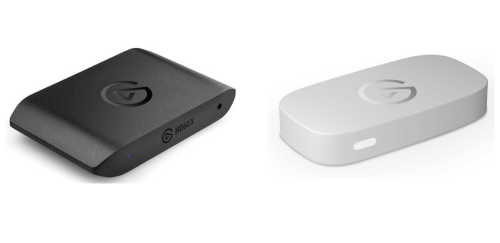
Why Do I Recommend The Elgato HD60 X?
- The Elgato HD60 X supports 3840×2160 at 30fps capture for recording higher-resolution gameplay footage with greater detail and flexibility in post-editing, while the Elgato Game Capture Neo supports 1920×1080 at 60fps capture.
- Elgato HD60 X features HDR10 capture at 1080p60 for preserving wider color range and improved contrast in recorded videos, whereas the Elgato Game Capture Neo supports HDR passthrough only without HDR recording.
- It supports variable refresh rate (VRR) to reduce screen tearing and maintain smoother gameplay during passthrough, whereas the Elgato Game Capture Neo does not support VRR.
- The Elgato HD60 X supports 1080p240 passthrough for enabling ultra-high refresh rate gaming on compatible monitors without limiting frame output, while the Elgato Game Capture Neo supports 1080p60 passthrough.
- Elgato HD60 X comes with 1440p120 passthrough support for maintaining higher frame rates at QHD resolution during gameplay, whereas the Elgato Game Capture Neo supports 1440p60 passthrough.
- It includes a 3.5mm analog audio input for capturing external audio sources such as microphones or mixers directly into the recording workflow, while the Elgato Game Capture Neo does not include an analog audio input.
- The Elgato HD60 X supports 10-bit HDR capture pipeline for improved color depth and more accurate color grading during editing, while the Elgato Game Capture Neo uses an 8-bit SDR capture pipeline.
- Elgato HD60 X features advanced capture configuration options for adjusting resolution, HDR settings, and recording formats to match different content creation needs, whereas the Elgato Game Capture Neo uses a simplified configuration with limited control options.
Maybe the Elgato Game Capture Neo can make you comfortable because it’s a little bit cheaper than the Elgato HD60 X. But you have to compromise all the above-mentioned features. Now the Decision is Yours. I hope it was helpful to choose the right one.
Side-by-Side Comparison
| Feature | Elgato HD60 X | Elgato Game Capture Neo |
| Maximum Capture Resolution | 3840×2160 @ 30fps | 1920×1080 @ 60fps |
| HDR Capture | HDR10 @ 1080p60 | Not supported for capture |
| 1440p Passthrough | 2560×1440 @ 120fps | 2560×1440 @ 60fps |
| 1080p Passthrough | 1920×1080 @ 240fps | 1920×1080 @ 60fps |
| Variable Refresh Rate (VRR) | Supported | Not supported |
| Capture Bit Depth | 10-bit HDR capture | 8-bit SDR capture |
| HDMI Version | HDMI 2.0 input/output | HDMI 2.0 input/output |
| Analog Audio Input | 3.5mm jack present | Not available |
| Capture Formats | 2160p30, 1440p60, 1080p60 | 1080p60, 1080p30, 720p60 |
| Instant Preview Latency | Instant Gameview | Standard preview latency |
| High Frame Rate Input Support | Up to 240Hz input passthrough | Up to 60Hz input passthrough |
| HDR Recording Mode | Available | Limited HDR passthrough only |
| Color Sampling | HDR pipeline support | SDR pipeline only |
| Max Input Resolution | 3840×2160 @ 60fps | 3840×2160 @ 60fps |
| Supported Capture Resolutions | 2160p, 1440p, 1080p | 1080p, 720p, 576p, 480p |
| Front Port Configuration | Front-facing audio input port | No front I/O ports |
| Software Feature Depth | Advanced configuration options | Basic configuration options |
| Capture Ceiling | 4K recording capability | Full HD recording only |
| Price | Check Elgato HD60 X Price | Check Game Capture Neo Price |
What Common Both Can Do?
- HDMI Input: Both devices include an HDMI input port, allowing direct connection from gaming consoles, cameras, or PCs. This ensures compatibility with modern video sources without requiring adapters.
- HDMI Output (Passthrough): Each model supports HDMI passthrough, enabling gameplay to be displayed on a monitor or TV while capturing simultaneously. This is essential for maintaining a normal gaming experience without delay.
- USB Interface: Both capture cards use a USB 3.0 Type-C connection for transferring video data to a computer. This provides sufficient bandwidth for smooth capture and streaming performance.
- Max Input Resolution: Each device accepts up to 3840×2160 at 60fps input, ensuring compatibility with 4K gaming consoles. This allows users to play in high resolution while capturing at supported formats.
- Plug and Play Setup: Both models support plug-and-play functionality, requiring no complex driver installation for basic use. This simplifies the setup process for new users.
- External Capture Card: Both are external capture devices, meaning they connect outside the computer rather than being installed internally. This makes them portable and easy to use across multiple systems.
- UVC Compatibility: Each device supports USB Video Class (UVC), allowing them to work with a wide range of software without special drivers. This improves compatibility across streaming and recording applications.
- OBS Studio Support: Both capture cards integrate with OBS Studio for streaming and recording. This enables flexible control over scenes, overlays, and encoding.
- Streamlabs Support: Each model is compatible with Streamlabs software, allowing easy streaming setup and customization. This is useful for beginners and advanced users alike.
- Windows Support: Both devices function on Windows systems, ensuring compatibility with the most widely used PC platform. This allows access to full software features and customization.
- macOS Support: Each capture card also supports macOS, enabling use with Apple computers. This provides flexibility for creators working across different operating systems.
- Console Compatibility: Both devices work with popular gaming consoles such as PlayStation and Xbox. This makes them suitable for console-based streaming and recording setups.
- PC Gaming Compatibility: Each model can capture gameplay from a PC using HDMI output. This allows streamers to record or broadcast high-performance PC gaming sessions.
- HDMI Passthrough Function: Both support real-time passthrough of the video signal to a display. This ensures uninterrupted gameplay while capturing footage.
- Real-Time Preview: Each device provides a real-time preview feed within capture software. This allows users to monitor recordings and streams directly from their computer.
- Bus Powered via USB: Both units draw power directly from the USB connection, eliminating the need for an external power adapter. This simplifies cable management and portability.
- Compact Form Factor: Each device has a small, portable design suitable for desktop setups or travel. This makes them convenient for creators who move between locations.
- Capture via USB to PC: Both capture cards send video data to a computer over USB for recording or streaming. This is the core functionality that enables content creation workflows.
Common Features
| Feature | Elgato HD60 X | Elgato Game Capture Neo |
| HDMI Input | Yes | Yes |
| HDMI Output (Passthrough) | Yes | Yes |
| USB Interface | USB 3.0 Type-C | USB 3.0 Type-C |
| Max Input Resolution | 3840×2160 @ 60fps | 3840×2160 @ 60fps |
| Plug and Play Setup | Yes | Yes |
| External Capture Card | Yes | Yes |
| UVC Compatibility | Yes | Yes |
| OBS Studio Support | Yes | Yes |
| Streamlabs Support | Yes | Yes |
| Windows Support | Yes | Yes |
| macOS Support | Yes | Yes |
| Console Compatibility | Yes | Yes |
| PC Gaming Compatibility | Yes | Yes |
| HDMI Passthrough Function | Yes | Yes |
| Real-Time Preview | Yes | Yes |
| Bus Powered via USB | Yes | Yes |
| Compact Form Factor | Yes | Yes |
| Capture via USB to PC | Yes | Yes |
| Price | Check Elgato HD60 X Price | Check Game Capture Neo Price |