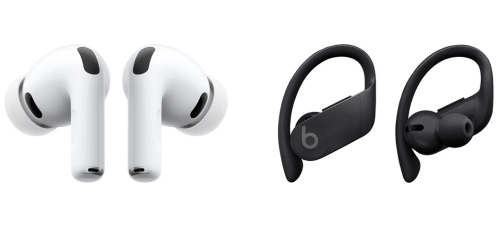
AirPods Pro 3 & Powerbeats Pro share many similarities, but there are also important differences, such as quality, performance, features, design, and connectivity. If you want the best one between them, I Would recommend the AirPods Pro 3 rather than the Powerbeats Pro.
Why Do I Recommend The AirPods Pro 3?
- The AirPods Pro 3 features active noise cancellation for reducing low-frequency ambient noise during travel and indoor use, whereas the Powerbeats Pro has no active noise cancellation.
- AirPods Pro 3 includes adaptive transparency mode for automatically adjusting external sound levels in real time to maintain situational awareness, while the Powerbeats Pro has no transparency mode.
- It supports personalized spatial audio with head tracking for directional sound placement and a more immersive listening experience in videos and music, whereas the Powerbeats Pro uses standard stereo audio.
- The AirPods Pro 3 comes with the Apple H3 chip for improved audio processing, lower latency, and more efficient power management, while the Powerbeats Pro uses the Apple H1 chip.
- AirPods Pro 3 has a MagSafe and Qi wireless charging case for cable-free charging convenience across multiple charging pads, while the Powerbeats Pro uses a Lightning wired charging case.
- It features a compact 5.6 g earbud weight for reduced ear fatigue during extended listening sessions, whereas the Powerbeats Pro uses a 20.3 g earbud with an ear-hook structure.
- The AirPods Pro 3 includes precision Find My tracking with UWB support and a built-in case speaker for locating both earbuds and case with directional guidance, while the Powerbeats Pro supports basic Find My tracking without precision location or case audio alerts.
- AirPods Pro 3 supports touch and swipe controls for adjusting volume and playback directly on the earbuds without physical buttons, whereas the Powerbeats Pro uses physical buttons for control input.
Maybe the Powerbeats Pro can make you comfortable because it’s a little bit cheaper than the AirPods Pro 3. But you have to compromise all the above-mentioned features. Now the Decision is Yours. I hope it was helpful to choose the right one.
Side-by-Side Comparison
| Feature | AirPods Pro 3 | Powerbeats Pro |
| Chipset | Apple H3 | Apple H1 |
| Bluetooth Version | 5.3 | 5.0 |
| Active Noise Cancellation | Yes | No |
| Transparency Mode | Yes | No |
| Spatial Audio | Yes | No |
| Driver Type | Custom high-excursion dynamic | Dynamic |
| Charging Port | USB-C | Lightning |
| Wireless Charging | Qi + MagSafe | No |
| Earbud Weight | 5.6 g | 20.3 g |
| Water Resistance | IP57 | IPX4 |
| Dust Resistance | Yes | No |
| Ear Tip Sizes | 5 sizes | 4 sizes |
| Control Type | Touch + swipe | Physical buttons |
| Volume Control | Swipe gesture | Physical rocker |
| Microphones | 6 microphones | Dual microphones |
| Voice Processing | Voice Isolation + ML | Standard beamforming |
| Find My Tracking | Precision | Basic |
| Case Speaker | Yes | No |
| Lanyard Loop | Yes | No |
| Adaptive Audio | Yes | No |
| Hearing Features | Hearing Aid + Conversation Awareness | No |
| Codec Support | AAC + adaptive processing | AAC |
| Multipoint Switching | Apple auto-switch | Apple switching |
| Design Structure | Stem-based | Ear hook |
| Price | Check AirPods Pro 3 Price | Check Powerbeats Pro Price |
What Common Both Can Do?
- Apple Ecosystem Integration: Both earbuds are designed to work seamlessly within the Apple ecosystem, enabling quick pairing and synchronized usage across Apple devices. This integration ensures a consistent and smooth experience when switching between iPhone, iPad, and Mac.
- Apple Chip Integration: Each model uses a dedicated Apple chip to manage connectivity, audio processing, and power efficiency. This allows stable wireless performance and optimized battery usage during daily use.
- Bluetooth Connectivity: Both devices rely on Bluetooth technology for wireless audio transmission. This enables compatibility with a wide range of devices including smartphones, tablets, and laptops.
- Wireless Stereo Pairing: Both earbuds support true wireless stereo functionality, meaning each earbud connects independently while maintaining synchronized audio playback. This ensures a balanced and immersive listening experience.
- In-Ear Design: Each product uses an in-ear form factor that fits directly into the ear canal. This design helps with passive noise isolation and secure placement during movement.
- Silicone Ear Tips: Both include silicone ear tips in multiple sizes for a customizable fit. Proper fit improves comfort and helps create a better acoustic seal for consistent sound delivery.
- Sweat Resistance: Both earbuds are designed to handle sweat exposure during workouts or daily activities. This makes them suitable for exercise and outdoor use without concern for minor moisture.
- Built-in Microphones: Each model features integrated microphones for voice capture. These microphones enable clear communication during calls and voice assistant interactions.
- Hands-Free Calling: Both support hands-free calling functionality, allowing users to answer and manage calls without touching their phone. This improves convenience during multitasking or commuting.
- AAC Codec Support: Both earbuds support the AAC audio codec for wireless streaming. This ensures efficient audio compression and stable sound quality on Apple devices.
- Siri Support: Each model provides access to Apple’s Siri voice assistant. This allows users to control playback, check information, or manage tasks using voice commands.
- Automatic Ear Detection: Both earbuds can detect when they are placed in or removed from the ears. This feature automatically pauses or resumes playback, improving usability and saving battery.
- Auto Device Switching (Apple): Both support automatic switching between Apple devices linked to the same account. This eliminates the need for manual reconnection when changing devices.
- Charging Case Included: Each product comes with a dedicated charging case for storage and battery extension. The case protects the earbuds and provides additional charging cycles on the go.
- Fast Charging Support: Both models support quick charging functionality. A short charging period provides enough power for immediate use when the battery is low.
- Independent Earbud Use: Both allow single-earbud operation, meaning either the left or right earbud can be used independently. This is useful for calls or when maintaining awareness of surroundings.
- Physical Media Control: Each device includes onboard controls for managing playback and calls. This allows users to adjust audio without interacting with their connected device.
- Firmware Updates via iOS: Both receive firmware updates through Apple devices. This ensures ongoing improvements, bug fixes, and feature optimizations over time.
Common Features
| Feature | AirPods Pro 3 | Powerbeats Pro |
| Apple Ecosystem Integration | Yes | Yes |
| Apple Chip Integration | Yes | Yes |
| Bluetooth Connectivity | Yes | Yes |
| Wireless Stereo Pairing | Yes | Yes |
| In-Ear Design | Yes | Yes |
| Silicone Ear Tips | Yes | Yes |
| Sweat Resistance | Yes | Yes |
| Built-in Microphones | Yes | Yes |
| Hands-Free Calling | Yes | Yes |
| AAC Codec Support | Yes | Yes |
| Siri Support | Yes | Yes |
| Automatic Ear Detection | Yes | Yes |
| Auto Device Switching (Apple) | Yes | Yes |
| Charging Case Included | Yes | Yes |
| Fast Charging Support | Yes | Yes |
| Independent Earbud Use | Yes | Yes |
| Physical Media Control | Yes | Yes |
| Firmware Updates via iOS | Yes | Yes |
| Price | Check AirPods Pro 3 Price | Check Powerbeats Pro Price |
FAQ
Which earbuds are better for workouts and sports use? Do both earbuds support Apple devices seamlessly? Which model has better noise cancellation features? How does battery life compare between the two models? Which earbuds are more comfortable for long listening sessions? Do both support wireless charging? Which earbuds are better for phone calls? Do both earbuds support Siri voice assistant? Which model has better portability? Are both earbuds water-resistant? Do both support using one earbud at a time? Which earbuds provide more advanced audio features? How do the controls differ between the two models? Which option is better for everyday casual use? |