TourBox Elite & TourBox Neo share many similarities, but there are also important differences, such as quality, performance, features, design, and connectivity. If you want the best one between them, I Would recommend the TourBox Elite rather than the TourBox Neo.
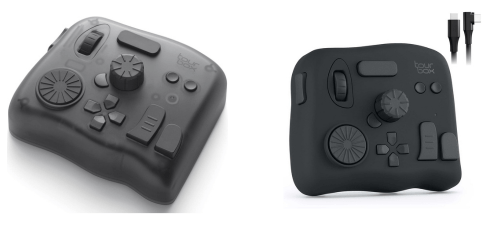
Why Do I Recommend The TourBox Elite?
- The TourBox Elite features Bluetooth 5.0 connectivity for wireless operation and reduced cable clutter in desk setups, while the TourBox Neo uses a USB-C wired connection.
- TourBox Elite supports dual-device pairing for switching between two computers without reconnecting cables during multitasking workflows, whereas the TourBox Neo supports a single wired connection to one device.
- It includes a dedicated device switching button for instant toggling between paired systems without interrupting active applications, while the TourBox Neo has no hardware switching control.
- The TourBox Elite comes with 2 × AA battery support for untethered use in flexible work environments without relying on USB power, whereas the TourBox Neo uses continuous USB 5V power.
- TourBox Elite features built-in vibration haptic feedback for clearer tactile confirmation during dial and knob adjustments in precision editing tasks, while the TourBox Neo uses mechanical feedback only.
- It supports Bluetooth low-latency mode for responsive input during wireless use in editing and design applications, whereas the TourBox Neo operates only through wired input.
- The TourBox Elite includes optional wired and wireless dual-mode operation for adapting to both mobile and fixed workstation setups, while the TourBox Neo supports wired-only operation.
- TourBox Elite offers limited Bluetooth HID compatibility to connect with a wider range of Bluetooth-enabled devices, whereas the TourBox Neo does not support wireless device connectivity.
Maybe the TourBox Neo can make you comfortable because it’s a little bit cheaper than the TourBox Elite. But you have to compromise all the above-mentioned features. Now the Decision is Yours. I hope it was helpful to choose the right one.
Side-by-Side Comparison
| Feature | TourBox Elite | TourBox Neo |
| Connectivity Type | Bluetooth 5.0 + USB-C | USB-C |
| Wireless Support | Yes | No |
| Multi-Device Pairing | 2 devices | 1 device |
| Device Switching | Hardware toggle button | Not available |
| Battery Type | 2 × AA batteries | No battery |
| Battery Voltage | 1.5V ×2 | Not applicable |
| Power Consumption | Battery-powered / USB 5V | USB 5V 30mA |
| Haptic Feedback | Yes | No |
| Feedback Type | Mechanical + haptic vibration | Mechanical only |
| Bluetooth Range | ~10 m | Not applicable |
| USB Usage Mode | Optional | Required |
| Firmware Mode | Dual-mode | USB-only |
| Pairing Method | Bluetooth pairing + USB setup | USB plug-and-play |
| Surface Coating | UV antibacterial coating | Standard rubberized coating |
| Color Options | Black / White / Smoke | Black only |
| Internal Hardware | Upgraded chip architecture | Standard chip |
| Latency Modes | Bluetooth low latency + wired | Wired only |
| Mobile Compatibility | Bluetooth HID limited support | Not supported |
| Price | Check TourBox Elite Price | Check TourBox Neo Price |
What Common Both Can Do?
- Programmable Buttons: Both controllers include multiple programmable buttons that can be assigned to different shortcuts. This allows users to customize workflows and streamline repetitive tasks across creative applications.
- Customizable Knobs: Each device features adjustable knobs that can be mapped to parameters like brush size or timeline zoom. This enables precise control during editing and improves workflow efficiency.
- Scroll Wheel Control: Both models include a scroll wheel for continuous input adjustments. This is useful for navigating timelines, zooming, and scrolling through layers or menus.
- Haptic Dial Control: Each controller includes a tactile dial mechanism that provides physical feedback during rotation. This enhances control precision and gives users a consistent input feel.
- Software Support: Both devices rely on the same TourBox software for configuration and customization. This ensures a consistent user experience regardless of which model is used.
- Supported OS (Windows): Both controllers are compatible with Windows systems. This allows users on Windows platforms to fully utilize all programmable features.
- Supported OS (macOS): Each model supports macOS, enabling seamless integration with Apple-based creative workflows. This ensures compatibility with industry-standard creative tools.
- App Profiles: Both devices allow users to create and switch between application-specific profiles. This helps tailor controls for different software environments like Photoshop or Premiere Pro.
- Macro Assignment: Each controller supports macro creation for executing multiple actions with a single input. This significantly reduces repetitive manual steps in editing tasks.
- Gesture Combinations: Both models support combination inputs using multiple buttons or dials simultaneously. This expands the number of possible commands beyond the physical control count.
- Onboard Memory Profiles: Each device stores profiles internally, allowing configurations to be retained without needing to reconfigure on another system. This improves portability across different workstations.
- Software UI Layout: Both use the same configuration interface within the TourBox software. This makes it easy for users to switch between models without relearning the setup process.
- Button Count Layout: The physical arrangement of buttons and controls is identical on both models. This ensures muscle memory remains consistent when switching devices.
- Encoder Type: Both controllers use rotary encoders for dial and knob inputs. This provides smooth and accurate incremental adjustments for creative tasks.
- Build Material: Each device is constructed using ABS and polycarbonate plastic. This combination provides durability while maintaining a manageable weight.
- Surface Texture: Both feature a matte surface finish that reduces fingerprints and improves grip. This helps maintain control during extended use sessions.
- USB Port Type: Each controller uses a USB-C port for wired connectivity. This ensures compatibility with modern computers and cables.
- Driver Installation: Both require TourBox software installation for full functionality. This allows access to advanced customization and feature control.
- Creative Software Support: Both models integrate with major creative tools like Adobe apps, Final Cut Pro, and Blender. This makes them versatile for a wide range of creative workflows.
- Firmware Updates: Each device supports firmware updates through the software. This allows performance improvements and feature enhancements over time.
Common Features
| Feature | TourBox Elite | TourBox Neo |
| Programmable Buttons | Yes | Yes |
| Customizable Knobs | Yes | Yes |
| Scroll Wheel Control | Yes | Yes |
| Haptic Dial Control | Yes | Yes |
| Software Support | Yes | Yes |
| Supported OS (Windows) | Yes | Yes |
| Supported OS (macOS) | Yes | Yes |
| App Profiles | Yes | Yes |
| Macro Assignment | Yes | Yes |
| Gesture Combinations | Yes | Yes |
| Onboard Memory Profiles | Yes | Yes |
| Software UI Layout | Same interface | Same interface |
| Button Count Layout | Same layout | Same layout |
| Encoder Type | Rotary encoders | Rotary encoders |
| Build Material | ABS + PC plastic | ABS + PC plastic |
| Surface Texture | Matte finish | Matte finish |
| USB Port Type | USB-C | USB-C |
| Driver Installation | Required software | Required software |
| Creative Software Support | Adobe / Final Cut / Blender | Adobe / Final Cut / Blender |
| Firmware Updates | Yes | Yes |
| Price | Check TourBox Elite Price | Check TourBox Neo Price |