The Samsung Odyssey G7 comes with a 240Hz refresh rate, aggressive 1000R curved design, and QLED panel technology that delivers fast gaming performance with vivid color reproduction. If you are looking for a monitor that balances competitive gaming speed, immersive visuals, and premium build quality, the Samsung Odyssey G7 stands out as a strong option in the high refresh rate gaming monitor category.
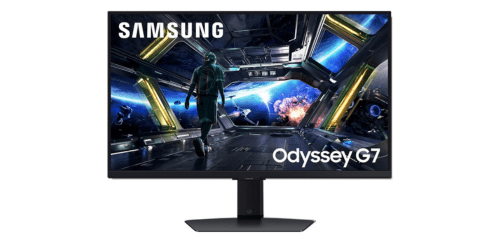
What Samsung Odyssey G7 Offer?
- The Samsung Odyssey G7 has a 240Hz refresh rate for delivering ultra smooth motion and reduced motion blur during fast paced competitive gaming.
- Samsung Odyssey G7 has a 1ms gray to gray response time for minimizing ghosting and ensuring fast visual transitions during intense gameplay.
- It has a 2560 × 1440 QHD resolution panel for producing sharper visuals and clearer details compared with standard Full HD gaming monitors.
- The Samsung Odyssey G7 has Quantum Dot QLED technology for enhancing color accuracy, brightness levels, and overall visual vibrancy in games and videos.
- Samsung Odyssey G7 has a 1000R curved screen for creating a more immersive viewing experience that matches the natural curvature of human vision.
- It has NVIDIA G Sync Compatible and AMD FreeSync Premium Pro support for synchronizing refresh rates with GPUs to eliminate screen tearing and stuttering.
- The Samsung Odyssey G7 has VESA DisplayHDR 600 certification for improving brightness, contrast, and highlight detail in HDR supported content.
- Samsung Odyssey G7 has a high contrast VA panel for producing deeper blacks and richer shadow detail during dark gaming scenes and cinematic content.
- It has DisplayPort 1.4 and HDMI connectivity for supporting high bandwidth video signals and easy connection with gaming PCs, laptops, and consoles.
- Samsung Odyssey G7 has an ergonomic adjustable stand for enabling height, tilt, swivel, and pivot adjustments that improve comfort during long gaming sessions.
Pros & Cons
- 240Hz refresh rate enables extremely smooth competitive gameplay
- 1ms response time reduces ghosting and motion blur
- QHD resolution provides sharper detail than Full HD monitors
- Quantum Dot QLED panel improves color reproduction
- 1000R curvature increases immersion for gaming
- G Sync Compatible and FreeSync Premium Pro reduce screen tearing
- HDR600 support enhances brightness and contrast
- Solid build quality with adjustable ergonomic stand
- Large 1000R curve may take time to adjust for some users
- HDMI 2.0 limits 240Hz support for certain devices
- VA panel viewing angles are narrower than IPS panels
- HDR performance depends on game support
Comparison
| Feature | Samsung Odyssey G7 | LG 27GP850 | ASUS Swift PG279QM |
| Screen Size | 27 in / 32 in | 27 in | 27 in |
| Panel Type | VA QLED | Nano IPS | Fast IPS |
| Curvature | 1000R | Flat | Flat |
| Resolution | 2560 × 1440 | 2560 × 1440 | 2560 × 1440 |
| Refresh Rate | 240 Hz | 165 Hz | 240 Hz |
| Response Time | 1 ms GtG | 1 ms GtG | 1 ms GtG |
| Peak Brightness | 600 nits | 400 nits | 400 nits |
| HDR Certification | DisplayHDR 600 | DisplayHDR 400 | DisplayHDR 400 |
| Color Gamut | 95% DCI P3 | 98% DCI P3 | 98% DCI P3 |
| Adaptive Sync | G Sync Compatible, FreeSync Premium Pro | G Sync Compatible, FreeSync Premium | NVIDIA G Sync |
| DisplayPort | 1 × DisplayPort 1.4 | 1 × DisplayPort 1.4 | 1 × DisplayPort 1.4 |
| HDMI Ports | 2 × HDMI 2.0 | 2 × HDMI 2.0 | 2 × HDMI 2.0 |
| USB Ports | 2 × USB 3.0 | 2 × USB 3.0 | 2 × USB 3.0 |
| Stand Adjustments | Height, Tilt, Swivel, Pivot | Height, Tilt, Pivot | Height, Tilt, Swivel, Pivot |
| Weight | 7.2 kg | 6.1 kg | 7.1 kg |
| Power Consumption | 100 W | 65 W | 75 W |
| Price | Check Odyssey G7 Price | Check LG 27GP850 Price | Check PG279QM Price |
FAQ
Is the Samsung Odyssey G7 good for competitive gaming? Does the Samsung Odyssey G7 support NVIDIA G Sync? What resolution does the Samsung Odyssey G7 use? Is the 1000R curve useful for gaming? Can the Samsung Odyssey G7 run 240Hz on consoles? Does the Samsung Odyssey G7 support HDR gaming? Is the Samsung Odyssey G7 suitable for video editing or creative work? Does the Samsung Odyssey G7 have built in speakers? How adjustable is the Samsung Odyssey G7 stand? Does the Samsung Odyssey G7 work well with AMD graphics cards? Is the Samsung Odyssey G7 good for watching movies? Can the Samsung Odyssey G7 be wall mounted? Does the Samsung Odyssey G7 reduce eye strain? Is the Samsung Odyssey G7 good for multitasking? Who should buy the Samsung Odyssey G7? |