Asus Zenbook Duo stands out with its innovative dual screen design, powerful Intel processor options, and premium lightweight build that enhances productivity and multitasking. If you are looking for a laptop that balances cutting edge innovation, strong performance, and practical usability, the Asus Zenbook Duo is an excellent option for creators, professionals, and multitaskers.
What Asus Zenbook Duo Offer?
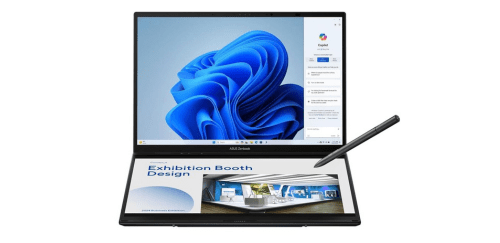
- The Asus Zenbook Duo has a dual 14 inch OLED touchscreen display system for expanding workspace and enabling seamless multitasking across two full sized screens.
- Asus Zenbook Duo has an Intel Core Ultra processor for delivering fast performance, efficient multitasking, and smooth handling of demanding productivity and creative applications.
- It has Intel Arc integrated graphics for supporting content creation, smooth video editing workflows, and improved visual performance in design applications.
- The Asus Zenbook Duo has up to 32GB LPDDR5X RAM to run multiple heavy applications, browser tabs, and productivity tools simultaneously without lag.
- Asus Zenbook Duo has up to 1TB PCIe 4.0 SSD storage for providing fast boot times, quick file transfers, and rapid loading of large applications and creative projects.
- It has a 2880 x 1800 OLED display resolution for delivering sharp visuals, vibrant colors, and accurate image reproduction for media consumption and creative work.
- The Asus Zenbook Duo has stylus compatible touchscreens for enabling precise drawing, note taking, and intuitive interaction with creative software tools.
- Asus Zenbook Duo has Thunderbolt 4 USB C connectivity for supporting high speed data transfer, external monitor connections, and fast charging through a single versatile port.
- It has WiFi 6E and Bluetooth connectivity to ensure faster wireless speeds, stable internet performance, and reliable connections with modern accessories.
- Asus Zenbook Duo has a 75Wh battery with fast charging support for allowing extended productivity sessions and quick power recovery when working on the go.
Pros & Cons
- Innovative dual screen design improves multitasking and workflow efficiency
- OLED display provides vivid colors and excellent contrast
- Powerful Intel processors support demanding creative workloads
- Premium aluminum chassis with a sleek and modern design
- Strong connectivity including Thunderbolt and fast wireless support
- High RAM capacity supports heavy multitasking
- Keyboard placement may require adjustment
- Dual screen setup can increase power consumption
Comparison
| Feature | Asus Zenbook Duo | Lenovo Yoga Book 9i | HP Spectre x360 14 |
| Processor | Intel Core Ultra 9 185H | Intel Core i7 1355U | Intel Core i7 1355U |
| RAM | 32GB LPDDR5X | 16GB LPDDR5 | 16GB LPDDR4x |
| Storage | 1TB PCIe 4.0 SSD | 1TB PCIe SSD | 1TB PCIe SSD |
| Primary Screen Size | 14 inches | 13.3 inches | 13.5 inches |
| Screen Resolution | 2880 x 1800 | 2880 x 1800 | 3000 x 2000 |
| Screen Type | OLED Touch | OLED Touch | OLED Touch |
| Secondary Screen | 14 inches OLED | 13.3 inches OLED | No |
| Graphics | Intel Arc Graphics | Intel Iris Xe | Intel Iris Xe |
| Video Playback | 4K | 4K | 4K |
| USB Ports | 2 x Thunderbolt 4 USB C | 3 x Thunderbolt 4 USB C | 2 x Thunderbolt 4 USB C |
| Connectivity | WiFi 6E, Bluetooth 5.3 | WiFi 6E, Bluetooth 5.2 | WiFi 6E, Bluetooth 5.2 |
| Battery Capacity | 75Wh | 80Wh | 66Wh |
| Battery Life | 13 hours | 10 hours | 12 hours |
| Weight | 1350 grams | 1340 grams | 1360 grams |
| Price | Check Asus Duo Price | Check Lenovo 9i Price | Check HP x360 Price |
FAQ
Is the Asus Zenbook Duo good for multitasking? Can the Asus Zenbook Duo handle video editing? Does the Asus Zenbook Duo support stylus input? How good is the display quality on the Asus Zenbook Duo? Is the Asus Zenbook Duo suitable for students? Does the Asus Zenbook Duo have good battery life? Can I connect external monitors to the Asus Zenbook Duo? Is the keyboard comfortable for long typing sessions? Is the Asus Zenbook Duo good for content creators? Does the laptop overheat during heavy tasks? Is the Zenbook Duo portable enough for travel? What storage options are available on the Asus Zenbook Duo? Can the second screen run full applications? Is the Asus Zenbook Duo good for programming or coding? Does the Asus Zenbook Duo support fast charging? |