Prusa MK4 & Elegoo Neptune 4 Max share many similarities, but there are also important differences, such as quality, performance, features, design, and connectivity. If you want the best one between them, I Would recommend the Prusa MK4 rather than the Elegoo Neptune 4 Max.
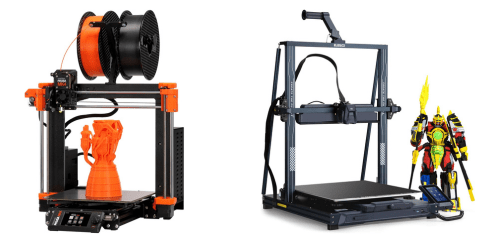
Why Do I Recommend The Prusa MK4?
- The Prusa MK4 has a load-cell based automatic first layer calibration system for precise nozzle-to-bed distance adjustment that improves first-layer consistency without manual tuning, while the Elegoo Neptune 4 Max uses a 121-point inductive mesh leveling system.
- Prusa MK4 features a 120 °C heated bed for stable adhesion when printing ABS, ASA, and other high-warp materials in open environments, whereas the Elegoo Neptune 4 Max supports a maximum heated bed temperature of 85 °C.
- It comes with a 32-bit custom xBuddy mainboard for advanced motion control and refined firmware integration that enhances reliability and diagnostic feedback, while the Elegoo Neptune 4 Max uses a standard 32-bit controller board.
- The Prusa MK4 has a maximum acceleration of approximately 20,000 mm/s² for reducing overall print time while maintaining controlled motion transitions, whereas the Elegoo Neptune 4 Max supports up to 8,000 mm/s² acceleration.
- Prusa MK4 features a compact 500 × 500 mm footprint for easier placement in limited workspace environments and desktop setups, while the Elegoo Neptune 4 Max uses a larger 590 × 640 mm frame footprint.
- It includes a fully integrated Prusa firmware ecosystem for automatic configuration profiles and consistent slicing integration through PrusaSlicer, while the Elegoo Neptune 4 Max relies on a more generic open-source firmware environment.
- The Prusa MK4 has a lighter 7 kg frame structure for easier relocation and maintenance access within small studios or home workshops, whereas the Elegoo Neptune 4 Max weighs approximately 22 kg.
- Prusa MK4 features a PEI spring steel build plate system for consistent part adhesion and easy flex-based removal without additional surface preparation, while the Elegoo Neptune 4 Max comes with a removable textured plate system.
Maybe the Elegoo Neptune 4 Max can make you comfortable because it’s a little bit cheaper than the Prusa MK4. But you have to compromise all the above-mentioned features. Now the Decision is Yours. I hope it was helpful to choose the right one.
Side-by-Side Comparison
| Feature | Prusa MK4 | Elegoo Neptune 4 Max |
| Build Volume (mm) | 250 × 210 × 220 | 420 × 420 × 480 |
| Max Print Speed (mm/s) | 600 | 500 |
| Max Heated Bed Temp (°C) | 120 | 85 |
| Print Bed Material | PEI spring steel | |
| Motion System | COREXY | Cartesian |
| Drive Type | Direct drive extruder | Dual-gear extruder |
| Maximum Acceleration (mm/s²) | ~20,000 | 8,000 |
| Display Size (inches) | 5 | 4.3 |
| Supported Filaments | PLA, ABS, PETG, ASA, Nylon | PLA, ABS, PETG, TPU, ASA, Nylon |
| Firmware Type | Prusa firmware | Open-source firmware |
| Bed Leveling | Automatic sensor mesh | 121-point mesh leveling |
| Spool Holder Position | Rear | Top |
| Belt Type | Gates belt | Standard GT2 belt |
| Price | Check Prusa MK4 Price | Check Elegoo Neptune 4 Max Price |
What Common Both Can Do?
- FDM Printing Technology: Both printers use fused deposition modeling, meaning they melt thermoplastic filament and deposit it layer by layer to build objects. This widely adopted technology ensures compatibility with common materials and slicing workflows.
- 1.75mm Filament Support: Each printer is designed for 1.75mm filament, which is the most common diameter in consumer 3D printing. This ensures easy material sourcing and broad compatibility with third-party filament brands.
- Heated Print Bed: Both models include a heated bed to improve first-layer adhesion and reduce warping. This feature is essential when printing materials like ABS and PETG.
- Automatic Bed Leveling: Each printer features automatic bed leveling to create a consistent first layer across the print surface. Proper leveling directly impacts print success and dimensional accuracy.
- Direct Drive Extruder: Both machines use a direct drive system where the extruder motor is mounted near the hotend. This configuration improves filament control and enhances performance with flexible materials.
- Removable Build Plate: Both printers come with a removable print surface for easy part removal. Flexible or spring-steel plates help prevent damage to printed objects during detachment.
- Power Loss Recovery: Each printer supports power loss recovery, allowing a print to resume after an unexpected outage. This reduces material waste and saves time on long prints.
- Filament Runout Sensor: Both models include a filament detection system that pauses printing when material runs out. This prevents failed prints due to empty spools.
- Color Touchscreen: Each printer features a color touchscreen interface for navigation and control. This simplifies printer management compared to traditional knob-based systems.
- USB Connectivity: Both printers allow USB-based file transfer or direct printing from external storage. This ensures straightforward offline operation without network dependency.
- Open-Source Firmware Support: Both machines operate on firmware compatible with open-source ecosystems. This enables customization, tuning, and firmware updates by advanced users.
- 32-bit Mainboard: Each printer uses a 32-bit controller board for processing print instructions. This supports smoother motion control and more complex firmware features.
- Silent Stepper Drivers: Both printers incorporate quiet stepper motor drivers to reduce operational noise. Lower noise levels make them suitable for home or office environments.
- Cooling Fans: Each printer includes part-cooling and hotend cooling fans. Proper airflow improves overhang performance and maintains stable extrusion temperatures.
- Resume Print Function: Both systems support print resume capabilities beyond power interruptions. This adds reliability for long-duration printing tasks.
- G-code Compatibility: Both printers read standard G-code files generated by slicing software. This ensures compatibility with major slicers and common workflow standards.
- Slicer Software Support: Each model works with mainstream slicing software platforms. This provides flexibility in tuning print settings and optimizing output quality.
Common Features
| Feature | Prusa MK4 | Elegoo Neptune 4 Max |
| FDM Printing Technology | Yes | Yes |
| 1.75mm Filament Support | 1.75mm | 1.75mm |
| Heated Print Bed | Yes | Yes |
| Automatic Bed Leveling | Yes | Yes |
| Direct Drive Extruder | Yes | Yes |
| Removable Build Plate | Yes | Yes |
| Power Loss Recovery | Yes | Yes |
| Filament Runout Sensor | Yes | Yes |
| Color Touchscreen | Yes | Yes |
| USB Connectivity | Yes | Yes |
| Open-Source Firmware Support | Yes | Yes |
| 32-bit Mainboard | Yes | Yes |
| Silent Stepper Drivers | Yes | Yes |
| Cooling Fans | Yes | Yes |
| Resume Print Function | Yes | Yes |
| G-code Compatibility | Yes | Yes |
| Slicer Software Support | Yes | Yes |
| Price | Check Prusa MK4 Price | Check Elegoo Neptune 4 Max Price |