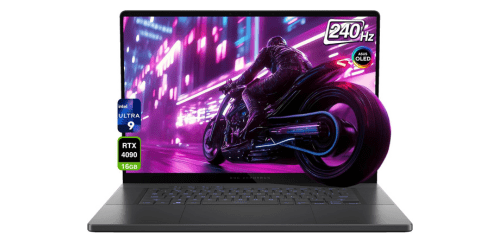
Asus ROG Zephyrus G16 comes with a sleek aluminum chassis, high-performance Intel Core Ultra processor options, and NVIDIA GeForce RTX graphics for serious gaming and creative workloads in a surprisingly portable form factor. If you are looking for a powerful yet refined gaming laptop that balances performance, portability, and premium build quality, the Asus ROG Zephyrus G16 stands out as a compelling option in the high-end laptop space.
What Asus ROG Zephyrus G16 Offer?
- The Asus ROG Zephyrus G16 has an Intel Core Ultra 9 processor for handling demanding multitasking, AI-enhanced workloads, and modern AAA games without performance slowdowns.
- Asus ROG Zephyrus G16 features NVIDIA GeForce RTX 40-series graphics for delivering high frame rates, real-time ray tracing, and accelerated rendering in creative applications.
- It has a 16-inch 2560 × 1600 OLED display with up to 240Hz refresh rate for ultra-smooth gameplay and accurate color reproduction in photo and video editing.
- The Asus ROG Zephyrus G16 includes up to 32GB LPDDR5X RAM for seamless multitasking across heavy software like Adobe Premiere Pro, Blender, and large open-world games.
- Asus ROG Zephyrus G16 supports PCIe 4.0 NVMe SSD storage up to 2TB for faster boot times, rapid file transfers, and reduced game loading screens.
- It comes with a vapor chamber cooling system and liquid metal thermal compound for maintaining stable performance during long gaming or rendering sessions.
- The Asus ROG Zephyrus G16 integrates a 90Wh battery for supporting extended productivity, streaming, and travel use without constant charging.
- Asus ROG Zephyrus G16 provides Thunderbolt 4, HDMI 2.1, USB-C, and Wi-Fi 6E connectivity for connecting high-resolution external monitors, fast storage devices, and low-latency wireless networks.
- It features a precision glass touchpad and backlit keyboard for comfortable typing, responsive controls, and improved usability during late-night gaming sessions.
Pros & Cons
- High-performance CPU and RTX 40-series GPU options
- High-resolution 240Hz OLED or Nebula display
- Premium aluminum build with slim profile
- Strong thermal management system
- Versatile connectivity including Thunderbolt 4
- Battery life reduces significantly during gaming
- Can run warm under sustained maximum load
Comparison
| Feature | Asus ROG Zephyrus G16 | Razer Blade 16 | MSI Stealth 16 Studio |
| Processor | Intel Core Ultra 9 185H | Intel Core i9-14900HX | Intel Core i9-13900H |
| GPU | NVIDIA RTX 4090 Laptop 16GB | NVIDIA RTX 4090 Laptop 16GB | NVIDIA RTX 4080 Laptop 12GB |
| Display Size | 16 inches | 16 inches | 16 inches |
| Resolution | 2560 × 1600 | 2560 × 1600 / 3840 × 2400 | 2560 × 1600 |
| Refresh Rate | 240Hz | 240Hz | 240Hz |
| Panel Type | OLED / IPS | Mini LED / IPS | IPS |
| RAM | Up to 32GB LPDDR5X | Up to 64GB DDR5 | Up to 64GB DDR5 |
| Storage | Up to 2TB PCIe 4.0 NVMe | Up to 4TB PCIe 4.0 NVMe | Up to 2TB PCIe 4.0 NVMe |
| Battery Capacity | 90Wh | 95Wh | 99.9Wh |
| Weight | 1.95 kg | 2.45 kg | 1.99 kg |
| USB Ports | 2 × USB-C, 2 × USB-A | 2 × USB-C, 3 × USB-A | 2 × USB-C, 2 × USB-A |
| Thunderbolt | Thunderbolt 4 | Thunderbolt 4 | Thunderbolt 4 |
| HDMI | HDMI 2.1 | HDMI 2.1 | HDMI 2.1 |
| Wi-Fi | Wi-Fi 6E | Wi-Fi 6E | Wi-Fi 6E |
| Webcam | 1080p | 1080p | 1080p |
| Price | Check Asus G16 Price | Check Razer 16 Price | Check Stealth 16 Price |
FAQ
Is Asus ROG Zephyrus G16 good for gaming at high settings? Can Asus ROG Zephyrus G16 handle video editing and 3D rendering? How long does the battery last on regular use? Does Asus ROG Zephyrus G16 have an OLED display option? Is the RAM upgradeable? Does it support external 4K monitors? Is it suitable for travel? Does it overheat during long gaming sessions? Is the keyboard comfortable for long typing sessions? Does it support Wi-Fi 6E? Can it be used for streaming? Does it have a high-quality webcam? Is it good for students in creative fields? How fast is the storage? Does it support advanced gaming features like ray tracing? |