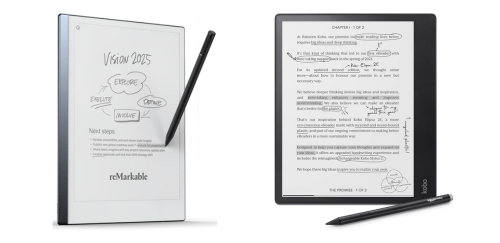
reMarkable 2 & Kobo Elipsa 2E share many similarities, but there are also important differences, such as quality, performance, features, design, and connectivity. If you want the best one between them, I Would recommend the reMarkable 2 rather than the Kobo Elipsa 2E.
Why Do I Recommend The reMarkable 2?
- The reMarkable 2 features a 4.7 mm aluminum chassis for a slimmer and more paper-like writing profile that sits flatter on desks and fits easily into document folders, whereas the Kobo Elipsa 2E has a 7.5 mm plastic-based body.
- reMarkable 2 has a textured CANVAS display surface for higher friction stylus input that closely replicates pencil-on-paper resistance during long note-taking sessions, while the Kobo Elipsa 2E uses a smooth E Ink Carta 1200 glass layer.
- It comes with a passive Marker system with 4,096 pressure levels for battery-free writing that eliminates charging interruptions during extended meetings, whereas the Kobo Elipsa 2E uses a rechargeable Kobo Stylus 2.
- The reMarkable 2 supports a distraction-free reMarkable OS interface for focused writing without store notifications or audiobook controls, while the Kobo Elipsa 2E includes Kobo Store access and media integration features.
- reMarkable 2 includes native desktop integration apps for Windows and macOS for direct drag-and-drop document transfer without relying on bookstore syncing, whereas the Kobo Elipsa 2E centers synchronization around the Kobo account ecosystem.
- It has an ultra-minimal home interface for faster notebook access with fewer layered menus during professional workflows, while the Kobo Elipsa 2E includes library navigation.
- The reMarkable 2 features automatic cloud-based handwriting conversion for converting full notebooks into typed text files ready for export, while the Kobo Elipsa 2E focuses on inline annotation tools within ebooks.
- reMarkable 2 includes magnetic stylus attachment along the device edge for secure pen storage during transport, whereas the Kobo Elipsa 2E uses a stylus design that charges separately via USB-C.
Maybe the Kobo Elipsa 2E can make you comfortable because it’s a little bit cheaper than the reMarkable 2. But you have to compromise all the above-mentioned features. Now the Decision is Yours. I hope it was helpful to choose the right one.
Side-by-Side Comparison
| Feature | reMarkable 2 | Kobo Elipsa 2E |
| Display Type | MONO E Ink CANVAS | E Ink Carta 1200 |
| Stylus Type | Marker/Marker Plus | Kobo Stylus 2 |
| Stylus Power | Passive | Rechargeable battery |
| PDF Annotation Tools | Basic | Advanced options |
| Supported Formats | PDF, converted EPUB | EPUB, PDF, MOBI, CBR, CBZ |
| Body Thickness | 4.7 mm | 7.5 mm |
| Operating System | reMarkable OS | Kobo Linux OS |
| Sync Ecosystem | reMarkable Cloud | Kobo Account Sync |
| Price | Check reMarkable 2 Price | Check Kobo Elipsa 2E Price |
What Common Both Can Do?
- Display Size: Both devices feature a 10.3-inch screen, providing a large canvas suitable for reading full-page documents and writing detailed notes. This size closely matches a traditional paper notebook, making long writing sessions comfortable.
- Screen Resolution: Each device uses a 1872 × 1404 pixel resolution display. This ensures crisp text rendering and clear handwriting visibility for extended reading and writing.
- E Ink Technology: Both tablets use E Ink displays, which reduce glare and eye strain compared to traditional LCD or OLED screens. This makes them well suited for long reading or writing sessions.
- Touchscreen Input: Each model supports capacitive touch input. This allows intuitive navigation through menus, documents, and notebooks without relying solely on physical buttons.
- Stylus Support: Both devices are designed for stylus-based interaction. This enables precise handwriting, sketching, and document markup similar to writing on paper.
- Handwriting Recognition: Both tablets support handwriting-to-text conversion. This allows users to convert written notes into digital text for sharing, editing, or exporting.
- PDF Annotation: Each device allows direct annotation on PDF documents. This makes them practical tools for reviewing contracts, academic papers, or work documents.
- Notebook Creation: Both offer built-in digital notebook functionality. Users can create multiple notebooks, organize notes, and structure content efficiently.
- Cloud Sync: Each tablet supports cloud synchronization. This enables users to access notes and documents across multiple devices.
- Wi-Fi Connectivity: Both devices include dual-band Wi-Fi support. This ensures stable wireless syncing and document transfers.
- USB-C Charging: Both models use USB-C ports for charging and data transfer. This provides compatibility with modern cables and charging adapters.
- Internal Storage: Each device includes built-in internal storage. This allows users to store documents and notes locally without external media.
- Rechargeable Battery: Both tablets contain rechargeable lithium-ion batteries. This supports extended usage without constant charging.
- Lightweight Design: Each device maintains a relatively lightweight form factor. This improves portability for students, professionals, and travelers.
- Linux-Based OS: Both operate on Linux-based systems tailored for E Ink functionality. This helps optimize performance and battery efficiency.
- Companion Mobile App: Each model integrates with a mobile or desktop companion app. This allows document transfer, cloud access, and syncing across devices.
- 10+ Week Standby Mode: Both devices are optimized for low power consumption in standby mode. This ensures extended battery preservation when not actively in use.
Common Features
| Feature | reMarkable 2 | Kobo Elipsa 2E |
| Display Size | 10.3-inch | 10.3-inch |
| Screen Resolution | 1872 × 1404 px | 1872 × 1404 px |
| E Ink Technology | Yes | Yes |
| Touchscreen Input | Yes | Yes |
| Stylus Support | Yes | Yes |
| Handwriting Recognition | Yes | Yes |
| PDF Annotation | Yes | Yes |
| Notebook Creation | Yes | Yes |
| Cloud Sync | Yes | Yes |
| Wi-Fi Connectivity | Yes | Yes |
| USB-C Charging | Yes | Yes |
| Internal Storage | Yes | Yes |
| Rechargeable Battery | Yes | Yes |
| Lightweight Design | Yes | Yes |
| Linux-Based OS | Yes | Yes |
| Companion Mobile App | Yes | Yes |
| 10+ Week Standby Mode | Yes | Yes |
| Price | Check reMarkable 2 Price | Check Kobo Elipsa 2E Price |
FAQ
Is reMarkable 2 better than Kobo Elipsa 2E for pure note-taking? Does Kobo Elipsa 2E have a front light while reMarkable 2 does not? Which device has more internal storage? Do both devices support PDF annotation? Can both devices convert handwriting to typed text? Is a stylus included with both devices? Do both tablets use E Ink displays? Which device supports audiobooks? Do both devices support Wi-Fi connectivity? Are both devices compatible with cloud syncing? Is Bluetooth available on both models? Do both tablets support EPUB files? Are both devices charged via USB-C? Which device is thinner? Are both devices suitable for long reading sessions? |