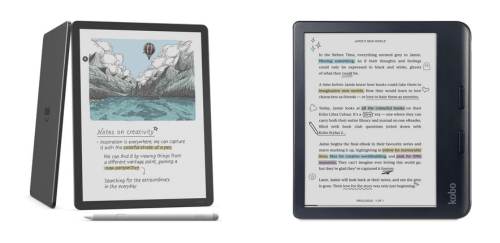
Kindle Scribe ColorSoft & Kobo Libra Colour share many similarities, but there are also important differences, such as quality, performance, features, design, and connectivity. If you want the best one between them, I Would recommend the Kindle Scribe ColorSoft rather than the Kobo Libra Colour.
Why Do I Recommend The Kindle Scribe ColorSoft?
- The Kindle Scribe Colorsoft features an 11-inch color E Ink display for viewing full-page PDFs, textbooks, and handwritten notes at near A4 scale without excessive zooming, whereas the Kobo Libra Colour features a 7-inch color E Ink display.
- Kindle Scribe Colorsoft includes a Premium Pen in the box for immediate handwriting, sketching, and margin annotation, without an additional purchase, while the Kobo Libra Colour requires the Kobo Stylus 2 to be sold separately.
- It comes with dedicated notebook templates and structured folder organization for managing multiple subjects, journals, and project notes efficiently, whereas the Kobo Libra Colour supports basic handwritten annotations within books.
- The Kindle Scribe Colorsoft supports Microsoft OneNote export for transferring handwritten notes directly into productivity workflows, while the Kobo Libra Colour supports Google Drive and Dropbox file access without native OneNote export integration.
- Kindle Scribe Colorsoft features handwriting-to-text conversion for turning written notes into editable digital text for easier sharing and document reuse, whereas the Kobo Libra Colour focuses on handwritten annotations without full notebook-based text conversion.
- It comes with larger 32 GB and 64 GB storage configurations for storing extensive notebooks, large PDFs, and illustrated books locally, while the Kobo Libra Colour comes with 32 GB storage.
- The Kindle Scribe Colorsoft has a thin 5.4 mm chassis for a flat writing surface that closely resembles paper on a desk, while the Kobo Libra Colour uses an 8.3 mm chassis with a grip-focused design.
- Kindle Scribe Colorsoft supports Audible integration for direct access to Amazon’s audiobook ecosystem with synchronized account libraries, whereas the Kobo Libra Colour uses Kobo Audiobooks within a separate storefront system.
Maybe the Kobo Libra Colour can make you comfortable because it’s a little bit cheaper than the Kindle Scribe ColorSoft. But you have to compromise all the above-mentioned features. Now the Decision is Yours. I hope it was helpful to choose the right one.
Side-by-Side Comparison
| Feature | Kindle Scribe ColorSoft | Kobo Libra Colour |
| Display size | 11 in | 7 in |
| Display technology | Colorsoft | E Ink Kaleido 3 |
| Grayscale levels | 16-level grayscale | Not specified |
| CPU | Quad-core | Dual 2.0 GHz |
| Storage | 32 GB or 64 GB | 32 GB |
| User-available storage | 21 GB / 50 GB | Not specified |
| Dimensions | 189 × 245 × 5.4 mm | 144.6 × 161 × 8.3 mm |
| Stylus included | Premium Pen | Kobo Stylus 2 |
| Pen dimensions | 155 × 8.8 mm | Not specified |
| Pen weight | 17 g | Not specified |
| Battery life (reading) | Up to 8 weeks | Up to 40 days |
| Battery life (writing) | Up to 2 weeks | Not specified |
| Charge time | < 3 hours | Not specified |
| Front light naming | Built-in light | ComfortLight PRO |
| Cloud import / sync | Google Drive, Microsoft OneDrive, Microsoft OneNote export | Google Drive, Dropbox |
| Native audiobook platform | Audible | Kobo Audiobooks |
| Native format support (examples) | AZW3, AZW, PDF, TXT, MOBI, PRC | EPUB, EPUB3, PDF, MOBI, TXT, HTML, RTF, CBZ, CBR + image formats |
| Wi-Fi bands / standard | 2.4 GHz + 5.0 GHz | Wi-Fi 802.11 ac/b/g/n |
| Device colors (as listed) | Graphite, Fig | Black, White |
| Price | Check Kindle Scribe ColorSoft Price | Check Kobo Libra Colour Price |
What Common Both Can Do?
- Color E Ink Display: Both devices use color E Ink technology, allowing users to view book covers, illustrations, comics, and highlighted notes in color. This improves the reading experience for graphic novels, educational materials, and visually rich content while maintaining the paper-like comfort of E Ink.
- Glare-Free Screen: Each model features a matte, glare-free display designed for comfortable reading in bright environments. This makes outdoor use practical without reflections interfering with visibility.
- Adjustable Front Light: Both readers include adjustable front lighting so users can control brightness for day or night reading. This reduces eye strain and allows comfortable reading in low-light conditions.
- Dark Mode: Both devices support dark mode, reversing text and background colors for nighttime reading. This feature helps minimize eye fatigue and can be more comfortable in dim environments.
- Touchscreen Input: Each model uses a responsive touchscreen for navigation, page turns, and menu interaction. This creates a smartphone-like experience while keeping the simplicity of an eReader.
- Stylus Support: Both devices support stylus input for writing notes and annotations. This enables users to interact directly with documents and personalize their reading experience.
- PDF Annotation: Each device allows PDF file annotation, including highlighting and writing notes. This is especially useful for students, researchers, and professionals working with documents.
- Wi-Fi Connectivity: Both devices support dual-band Wi-Fi connectivity. This ensures reliable downloading of books, syncing of reading progress, and access to cloud services.
- Bluetooth Support: Each reader includes Bluetooth capability for wireless audio features. This allows pairing with headphones for audiobook playback.
- USB-C Charging Port: Both models use USB-C for charging. This provides faster data transfer and compatibility with modern charging accessories.
- Cloud Sync: Both devices support cloud synchronization of books, notes, and reading progress. This allows users to continue reading across multiple devices without losing their place.
- Built-in Dictionary: Each reader includes an integrated dictionary for quick word lookups. This enhances comprehension without leaving the page.
- Highlighting & Notes: Both devices allow users to highlight text and add notes. This is valuable for studying, research, or keeping track of important passages.
- Long Battery Life (Weeks): Both models are designed to last for weeks on a single charge under typical usage. This makes them convenient for travel and daily reading without frequent recharging.
- Waterproof Rating: Each device carries an IPX8 rating for water resistance. This allows safe reading near water or in humid environments.
- eBook Store Integration: Both readers are directly connected to their respective online bookstores. This makes browsing, purchasing, and downloading new titles seamless.
- Adjustable Font Size & Style: Both devices allow users to customize font size and style. This improves accessibility and ensures comfortable reading for different preferences.
- Reading Progress Sync: Each device syncs reading progress across apps and compatible platforms. This ensures continuity when switching between devices.
Common Features
| Feature | Kindle Scribe ColorSoft | Kobo Libra Colour |
| Color E Ink Display | Yes | Yes |
| Glare-Free Screen | Yes | Yes |
| Adjustable Front Light | Yes | Yes |
| Dark Mode | Yes | Yes |
| Touchscreen Input | Yes | Yes |
| Stylus Support | Yes | Yes |
| PDF Annotation | Yes | Yes |
| Wi-Fi Connectivity | 2.4 GHz / 5 GHz | 2.4 GHz / 5 GHz |
| Bluetooth Support | Yes | Yes |
| USB-C Charging Port | Yes | Yes |
| Cloud Sync | Yes | Yes |
| Built-in Dictionary | Yes | Yes |
| Highlighting & Notes | Yes | Yes |
| Long Battery Life (Weeks) | Yes | Yes |
| Waterproof Rating | IPX8 | IPX8 |
| eBook Store Integration | Yes | Yes |
| Adjustable Font Size & Style | Yes | Yes |
| Reading Progress Sync | Yes | Yes |
| Price | Check Kindle Scribe ColorSoft Price | Check Kobo Libra Colour Price |
FAQ
Do both devices support color eBooks and comics? Which device is better for note-taking and handwriting? Are both devices waterproof? Do both support audiobooks? Can I annotate PDF documents on both devices? Do they both have adjustable front lighting? Is Wi-Fi available on both eReaders? Do both devices support stylus input? Can I sync my reading progress across devices? Do both devices allow font customization? How long does the battery last on each device? Do they support highlighting and text notes? Are both devices suitable for outdoor reading? Do both devices connect to online bookstores directly? |