Asus ZenBook 14 comes with a sleek all-metal design, powerful Intel Core Ultra processors, and long-lasting battery life. If you are looking for a perfect balance between portability, performance, and premium features, the Asus ZenBook 14 stands out as a strong ultrabook choice for students, professionals, and creators alike.
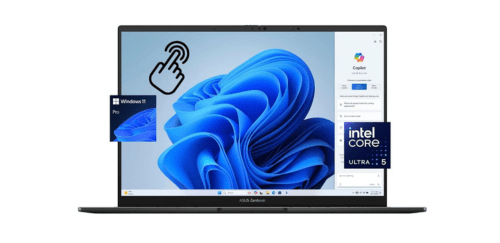
What Asus ZenBook 14 Offer?
- The Asus ZenBook 14 has an Intel Core Ultra 7 processor for delivering fast multitasking performance, AI acceleration, and efficient power management during demanding workloads.
- Asus ZenBook 14 has Intel Arc integrated graphics for smooth 4K video playback, accelerated creative applications, and responsive casual gaming performance.
- It has a 14 inch 2880 x 1800 OLED display for producing deep blacks, high contrast visuals, and accurate color reproduction suitable for content creation and streaming.
- The Asus ZenBook 14 has a 120Hz refresh rate panel for smoother scrolling, fluid animations, and more responsive on-screen interactions.
- Asus ZenBook 14 has up to 16GB LPDDR5X memory for maintaining stable performance while running multiple applications and browser tabs simultaneously.
- It has a 1TB PCIe 4.0 SSD for providing fast boot times, rapid file transfers, and quick application loading.
- The Asus ZenBook 14 has a 75Wh battery for supporting extended work sessions, online meetings, and entertainment without frequent charging.
- Asus ZenBook 14 has Thunderbolt 4 connectivity for enabling high speed data transfer, external display support, and versatile docking options.
- It support Wi Fi 6E for ensuring faster wireless speeds, lower latency, and more reliable connections in crowded networks.
Pros & Cons
- Premium aluminum build with slim profile
- High resolution OLED display with 120Hz refresh rate
- Strong performance for productivity and light creative work
- Long battery life with fast charging support
- Comprehensive port selection including Thunderbolt 4
- Integrated graphics not suitable for intensive gaming
- RAM is soldered and not upgradeable
- OLED display may require brightness management for static content
Comparison
| Feature | Asus ZenBook 14 | Dell XPS 13 | HP Spectre x360 14 |
| Processor | Intel Core Ultra 7 155H | Intel Core Ultra 7 155H | Intel Core Ultra 7 155H |
| Cores / Threads | 16 cores / 22 threads | 16 cores / 22 threads | 16 cores / 22 threads |
| Graphics | Intel Arc Graphics | Intel Arc Graphics | Intel Arc Graphics |
| RAM | 16GB LPDDR5X 7467MHz | 16GB LPDDR5X 7467MHz | 16GB LPDDR5X 7467MHz |
| Storage | 1TB PCIe 4.0 SSD | 1TB PCIe 4.0 SSD | 1TB PCIe 4.0 SSD |
| Display Size | 14.0 inches | 13.4 inches | 13.5 inches |
| Resolution | 2880 x 1800 | 2880 x 1800 | 3000 x 2000 |
| Panel Type | OLED | OLED | OLED Touch |
| Refresh Rate | 120Hz | 60Hz | 120Hz |
| Aspect Ratio | 16:10 | 16:10 | 3:2 |
| Camera | 1080p IR | 1080p IR | 9MP IR |
| Wi Fi | Wi Fi 6E | Wi Fi 6E | Wi Fi 6E |
| Bluetooth | 5.3 | 5.3 | 5.3 |
| USB Ports | 2 x Thunderbolt 4, 1 x USB A | 2 x Thunderbolt 4 | 2 x Thunderbolt 4, 1 x USB A |
| HDMI | HDMI 2.1 | No | HDMI 2.1 |
| Battery Capacity | 75Wh | 55Wh | 68Wh |
| Battery Life | Up to 15 hours | Up to 12 hours | Up to 13 hours |
| Weight | 1.2 kg | 1.19 kg | 1.36 kg |
| Price | Check ZenBook 14 Price | Check XPS 13 Price | Check HP x360 Price |
FAQ
Is Asus ZenBook 14 good for video editing? Does Asus ZenBook 14 support external monitors? How long does the battery last in real use? Is the RAM upgradeable? Is Asus ZenBook 14 suitable for gaming? Does the OLED display cause burn in? Is it good for students? Does it have a fingerprint sensor? Can it handle programming workloads? How is the keyboard experience? Does it support fast charging? Is the laptop durable? Does it run quietly? Is Wi Fi performance reliable? Is it good for watching movies? |