Motorola MB8600 & NETGEAR CM1000 share many similarities, but there are also important differences, such as quality, performance, features, design, and connectivity. If you want the best one between them, I Would recommend the Motorola MB8600 rather than the NETGEAR CM1000.
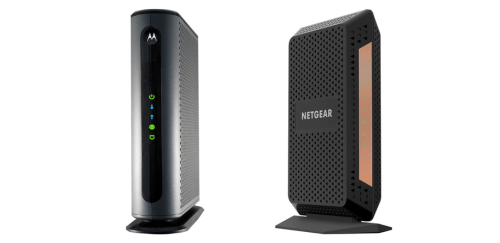
Why Do I Recommend The Motorola MB8600?
- The Motorola MB8600 has four Gigabit Ethernet ports for connecting multiple wired devices or enabling advanced router configurations without an external switch, while the NETGEAR CM1000 has one Gigabit Ethernet port.
- Motorola MB8600 supports link aggregation on two Ethernet ports for achieving up to 2 Gbps wired throughput with a compatible router, whereas the NETGEAR CM1000 uses a single 1 Gbps Ethernet connection.
- It comes with 802.3ad LACP support for combining two LAN ports into one logical high-bandwidth link for multi-gigabit internet plans, while the NETGEAR CM1000 includes no link aggregation capability.
- The Motorola MB8600 features a 12V 2.5A power adapter for delivering up to 30W of power to support multi-port operation under sustained load, compared to the NETGEAR CM1000’s 12V 1.5A adapter rated at 18W.
- Motorola MB8600 includes explicit support for DOCSIS 2.0 and 1.1 backward compatibility for maintaining connectivity on legacy cable systems during infrastructure transitions, while the NETGEAR CM1000 specifies backward compatibility to DOCSIS 3.0.
- It has configurable upstream diplex filter settings of 5–42 MHz and 5–85 MHz for adapting to different cable plant configurations, whereas the NETGEAR CM1000 does not specify adjustable diplex filter options.
- The Motorola MB8600 lists downstream signal level tolerance of −15 to +15 dBmV for handling wider incoming signal variations from the cable provider, while the NETGEAR CM1000 does not publish a specific downstream power range.
- Motorola MB8600 includes four active Ethernet ports for distributing wired connections directly from the modem in bridge configurations for lab setups or advanced networking environments, while the NETGEAR CM1000 includes a single Ethernet port.
Maybe the NETGEAR CM1000 can make you comfortable because it’s a little bit cheaper than the Motorola MB8600. But you have to compromise all the above-mentioned features. Now the Decision is Yours. I hope it was helpful to choose the right one.
Side-by-Side Comparison
| Feature | Motorola MB8600 | NETGEAR CM1000 |
| LAN Ethernet ports | 4 × 1GbE RJ-45 | 1 × 1GbE RJ-45 |
| LAN port count used for internet | 2 | 1 |
| Link aggregation (LACP 802.3ad) | Yes | Not specified |
| Max LAN link (bonded) | 2 Gbps | N/A |
| DOCSIS 2.0 / 1.1 backward support (explicit) | Yes / Yes | Not specified |
| Max downstream data rate (listed) | 6,000 Mbps | Not specified |
| Max upstream data rate (listed) | 800 Mbps | Not specified |
| Downstream frequency range (listed) | 108–1002 MHz | Not specified |
| Upstream frequency range (listed) | 5–85 MHz | Not specified |
| Diplex filter options (listed) | 5–42 MHz / 5–85 MHz | Not specified |
| Downstream level range (listed) | −15 to +15 dBmV | Not specified |
| Power input (adapter) | 100–240 VAC | 110–120 VAC |
| Power output (adapter) | 12 VDC, 2.5 A | 12 VDC, 1.5 A |
| Power output (watts) | 30 W | 18 W |
| Dimensions (in) | 7.88 × 7.25 × 2.25 | 8.80 × 3.50 × 5.90 |
| Dimensions (mm) | 200 × 184 × 57 | 223.5 × 88.9 × 150 |
| Included accessories (listed) | Coax connection tool; Velcro tie | Not specified |
| Price | Check Motorola MB8600 Price | Check NETGEAR CM1000 Price |
What Common Both Can Do?
- DOCSIS 3.1: Both modems support the DOCSIS 3.1 standard, which enables multi-gigabit cable internet capability and improved network efficiency. This ensures compatibility with modern high-speed cable internet plans.
- DOCSIS 3.0 Backward Compatibility: Each device maintains compatibility with DOCSIS 3.0 networks. This allows operation on providers that have not fully transitioned to DOCSIS 3.1 infrastructure.
- Downstream SC-QAM Channels: Both modems support 32 downstream SC-QAM channels. This allows aggregation of multiple channels for higher download throughput under DOCSIS 3.0 mode.
- Upstream SC-QAM Channels: Each model supports 8 upstream SC-QAM channels. This enables stable upstream bandwidth for uploads and interactive traffic.
- Downstream OFDM Channels: Both units include 2 downstream OFDM channels. OFDM improves spectral efficiency and supports higher throughput under DOCSIS 3.1.
- Upstream OFDMA Channels: Each modem supports 2 upstream OFDMA channels. OFDMA enhances upstream efficiency and performance under DOCSIS 3.1 networks.
- Gigabit Ethernet Support: Both devices include Gigabit Ethernet capability rated at 10/100/1000 Mbps. This allows full utilization of gigabit-class internet plans.
- RJ-45 Ethernet Port: Each modem provides at least one RJ-45 Ethernet interface. This ensures compatibility with standard consumer routers.
- Coaxial Cable Input: Both models use a standard F-type coaxial connector. This allows direct connection to cable wall outlets without proprietary adapters.
- IPv4 Support: Each modem supports IPv4 networking protocols. This ensures compatibility with existing internet addressing systems.
- IPv6 Support: Both devices support IPv6. This provides compatibility with next-generation IP addressing and future network expansion.
- Cable Provider Compatibility: Each modem is designed for use with major cable internet service providers. This ensures wide deployment across DOCSIS-based networks.
- Modem-Only Design: Both units function strictly as cable modems. They require a separate router for WiFi and network distribution.
- Built-in WiFi: Neither device includes integrated wireless networking hardware. This allows users to pair them with a router of their choice.
- Built-in Router: Both models lack integrated routing functionality. Network management and NAT features must be handled by an external router.
- Operating Temperature Range: Each modem operates within a 0°–40°C (32°–104°F) range. This ensures stable performance under normal indoor environmental conditions.
- LED Status Indicators: Both devices include front-panel LED indicators. These lights provide visual feedback for power, downstream, upstream, and internet status.
- External Power Adapter: Each modem uses an external 12 VDC power supply. This separates AC conversion from the modem chassis.
- Desktop Form Factor: Both models are designed for desktop placement. This supports vertical or horizontal installation depending on model orientation.
- Black Enclosure: Each modem features a black exterior housing. This matches common networking equipment aesthetics and blends with standard home setups.
Common Features
| Feature | Motorola MB8600 | NETGEAR CM1000 |
| DOCSIS Standard | DOCSIS 3.1 | DOCSIS 3.1 |
| DOCSIS 3.0 Backward Compatibility | Yes | Yes |
| Downstream SC-QAM Channels | 32 | 32 |
| Upstream SC-QAM Channels | 8 | 8 |
| Downstream OFDM Channels | 2 | 2 |
| Upstream OFDMA Channels | 2 | 2 |
| Gigabit Ethernet Support | 10/100/1000 Mbps | 10/100/1000 Mbps |
| RJ-45 Ethernet Port | Yes | Yes |
| Coaxial Cable Input | F-type connector | F-type connector |
| IPv4 Support | Yes | Yes |
| IPv6 Support | Yes | Yes |
| Cable Provider Compatibility | Major U.S. cable ISPs | Major U.S. cable ISPs |
| Modem-Only Design | Yes | Yes |
| Built-in WiFi | No | No |
| Built-in Router | No | No |
| Operating Temperature Range | 0°–40°C | 0°–40°C |
| LED Status Indicators | Yes | Yes |
| External Power Adapter | 12 VDC | 12 VDC |
| Desktop Form Factor | Yes | Yes |
| Black Enclosure | Yes | Yes |
| Price | Check Motorola MB8600 Price | Check NETGEAR CM1000 Price |