NETGEAR R8000 & NETGEAR R7800 share many similarities, but there are also important differences, such as quality, performance, features, design, and connectivity. If you want the best one between them, I Would recommend the NETGEAR R8000 rather than the NETGEAR R7800.
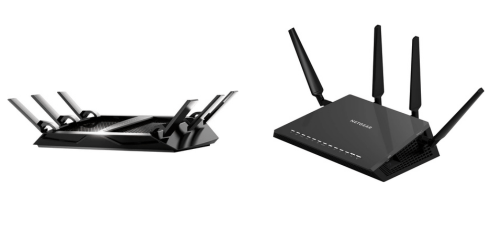
Why Do I Recommend The NETGEAR R8000?
- The Netgear R8000 features a tri-band configuration with one 2.4 GHz band and two separate 5 GHz bands for distributing high-bandwidth devices across dedicated wireless channels in multi-device households, while the Netgear R7800 uses a dual-band configuration with one 2.4 GHz band and one 5 GHz band.
- Netgear R8000 has dual independent 5 GHz radios for separating gaming, streaming, and large file transfers onto different 5 GHz networks to reduce congestion between active devices, whereas the Netgear R7800 has a single 5 GHz radio handling all 5 GHz traffic.
- It comes with a combined AC3200 wireless rating for allocating up to 1300 Mbps on each 5 GHz band simultaneously in parallel network environments, while the Netgear R7800 has an AC2600 rating with a single 1733 Mbps 5 GHz channel.
- The Netgear R8000 includes six external antennas for wider spatial signal dispersion across multiple rooms and floors in large home layouts, while the Netgear R7800 uses four external antennas.
- Netgear R8000 supports Smart Connect band steering for automatically assigning devices to one of three available bands based on load balancing requirements, whereas the Netgear R7800 manages devices across only two available bands.
- It features a 3×3 stream architecture on each of its three radios for maintaining balanced throughput distribution across separate wireless bands in multi-client scenarios, while the Netgear R7800 uses a 4×4 architecture on a single 5 GHz band.
- The Netgear R8000 comes with two dedicated 5 GHz networks for isolating latency-sensitive devices such as gaming consoles from high-throughput streaming devices to maintain stable performance under simultaneous usage, while the Netgear R7800 consolidates all 5 GHz devices onto one network.
- Netgear R8000 has a three-radio topology for supporting simultaneous multi-band traffic segmentation in environments with 20+ connected devices, whereas the Netgear R7800 operates with a two-radio topology handling all wireless traffic across two bands.
Maybe the NETGEAR R7800 can make you comfortable because it’s a little bit cheaper than the NETGEAR R8000. But you have to compromise all the above-mentioned features. Now the Decision is Yours. I hope it was helpful to choose the right one.
Side-by-Side Comparison
| Feature | NETGEAR R8000 | NETGEAR R7800 |
| Wi-Fi class | AC3200 | AC2600 |
| Bands | Tri-band | Dual-band |
| 5 GHz max link rate | 1300 Mbps + 1300 Mbps | 1733 Mbps |
| SoC | Broadcom BCM4709A0 | Qualcomm Atheros IPQ8065 |
| CPU | Dual-core 1.0 GHz | Dual-core 1.7 GHz |
| USB ports | 1× USB 3.0 + 1× USB 2.0 | 2× USB 3.0 |
| Antennas | 6 external | 4 external |
| 5 GHz radios | 2 | 1 |
| 5 GHz client distribution | Split across 5G-1 / 5G-2 | Single 5G |
| Target Wi-Fi topology | Tri-radio load distribution | Dual-radio MU-MIMO topology |
| Price | Check NETGEAR R8000 Price | Check NETGEAR R7800 Price |
What Common Both Can Do?
- Wi-Fi Standard: Both routers support the 802.11a/b/g/n/ac standards, ensuring compatibility with legacy and modern Wi-Fi devices. This allows smartphones, laptops, smart TVs, and IoT devices to connect without protocol limitations.
- Gigabit LAN Ports: Each model includes four 10/100/1000 Mbps Ethernet LAN ports for wired connections. This enables high-speed connections for gaming consoles, desktop PCs, NAS devices, and smart TVs.
- Gigabit WAN Port: Both routers feature a Gigabit Ethernet WAN port for connecting to a broadband modem. This supports internet plans up to 1 Gbps over wired WAN.
- USB Connectivity: Each router includes USB ports for connecting external storage or printers. This enables shared storage access and basic network file serving.
- Beamforming: Both models support beamforming technology. This helps direct Wi-Fi signals toward connected devices instead of broadcasting equally in all directions.
- QoS Support: Each router includes Dynamic QoS functionality. This allows traffic prioritization for applications such as gaming, streaming, and video conferencing.
- Guest Network: Both devices support separate guest Wi-Fi networks. This allows visitors to access the internet without accessing the main network resources.
- IPv6 Support: Each router supports IPv6 networking. This ensures compatibility with modern ISP deployments and future internet addressing standards.
- VPN Support: Both routers support OpenVPN. This allows secure remote access to the home network over the internet.
- DLNA Media Server: Each model includes DLNA media server capability. This enables streaming of media files from connected USB storage to compatible devices on the network.
- ReadySHARE USB Storage: Both routers support Netgear ReadySHARE. This makes it possible to share USB storage across multiple devices on the local network.
- Parental Controls: Each router includes parental control features. This allows filtering and managing internet access for specific devices or users.
- WPA/WPA2 Security: Both routers support WPA and WPA2 wireless encryption. This protects the wireless network from unauthorized access.
- WPS Push Button: Each model includes Wi-Fi Protected Setup push-button functionality. This allows compatible devices to connect quickly without manually entering a password.
- Web-Based Management: Both routers provide browser-based configuration interfaces. This allows users to manage network settings from a desktop or laptop.
- LED Status Indicators: Each router includes front-panel LED indicators. These provide visual feedback on power, internet connectivity, and wireless activity.
- External Antennas: Both models use external antennas. This design supports adjustable positioning for optimizing signal direction.
- 80 MHz Channel Width (5 GHz): Each router supports 80 MHz channel width on the 5 GHz band. This enables higher theoretical throughput compared to narrower channel widths.
Common Features
| Feature | NETGEAR R8000 | NETGEAR R7800 |
| Wi-Fi Standard | 802.11a/b/g/n/ac | 802.11a/b/g/n/ac |
| Gigabit LAN Ports | 4 × 10/100/1000 Mbps | 4 × 10/100/1000 Mbps |
| Gigabit WAN Port | 1 × 10/100/1000 Mbps | 1 × 10/100/1000 Mbps |
| USB Connectivity | Yes | Yes |
| Beamforming | Yes | Yes |
| QoS Support | Dynamic QoS | Dynamic QoS |
| Guest Network | Yes | Yes |
| IPv6 Support | Yes | Yes |
| VPN Support | OpenVPN | OpenVPN |
| DLNA Media Server | Yes | Yes |
| ReadySHARE USB Storage | Yes | Yes |
| Parental Controls | Yes | Yes |
| WPA/WPA2 Security | Yes | Yes |
| WPS Push Button | Yes | Yes |
| Web-Based Management | Yes | Yes |
| LED Status Indicators | Yes | Yes |
| External Antennas | Yes | Yes |
| 80 MHz Channel Width (5 GHz) | Yes | Yes |
| Price | Check NETGEAR R8000 Price | Check NETGEAR R7800 Price |