Netgear R7000 & Netgear R6700 share many similarities, but there are also important differences, such as quality, performance, features, design, and connectivity. If you want the best one between them, I Would recommend the Netgear R7000 rather than the Netgear R6700.
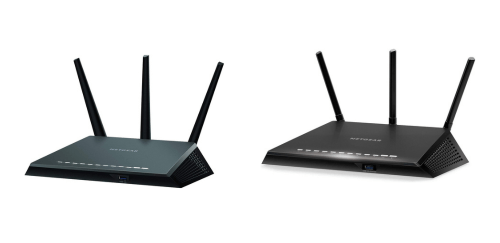
Why Do I Recommend The Netgear R7000?
- The Netgear R7000 has an AC1900 Wi-Fi rating for delivering a combined theoretical throughput of up to 1900 Mbps across dual bands for handling heavier network traffic, while the Netgear R6700 has an AC1750 Wi-Fi rating.
- Netgear R7000 has a 1 GHz dual-core processor for processing routing, NAT, and USB storage tasks with higher clock frequency under load, whereas the Netgear R6700 uses an 800 MHz processor.
- It includes 256-QAM modulation on the 2.4 GHz band for increasing per-stream data rates to 200 Mbps per stream under compatible conditions, while the Netgear R6700 uses 64-QAM modulation limited to 150 Mbps per stream.
- The Netgear R7000 comes with 256 MB RAM for handling more simultaneous connections and reducing slowdowns during multiple high-bandwidth tasks, while the Netgear R6700 comes with 128 MB RAM.
- Netgear R7000 supports up to 600 Mbps on the 2.4 GHz band for maintaining higher bandwidth capacity for legacy devices and smart home equipment, whereas the Netgear R6700 supports up to 450 Mbps on the 2.4 GHz band.
- It includes one USB 3.0 port and one USB 2.0 port for connecting both high-speed storage devices and additional peripherals at the same time, while the Netgear R6700 includes only one USB 3.0 port.
- The Netgear R7000 features 128 MB flash storage for accommodating firmware updates and advanced configuration features with additional storage headroom, while the Netgear R6700 features 128 MB but operates with lower RAM capacity.
- Netgear R7000 has a 285 × 184 × 50 mm chassis for accommodating larger internal heat dissipation components during sustained data transfer sessions, whereas the Netgear R6700 has a 209 × 151 × 34 mm chassis.
Maybe the Netgear R6700 can make you comfortable because it’s a little bit cheaper than the Netgear R7000. But you have to compromise all the above-mentioned features. Now the Decision is Yours. I hope it was helpful to choose the right one.
Side-by-Side Comparison
| Feature | Netgear R7000 | Netgear R6700 |
| Wi-Fi Class | AC1900 | AC1750 |
| Theoretical Total Wi-Fi Throughput (Mbps) | 1900 | 1750 |
| 2.4 GHz Maximum PHY Rate (Mbps) | 600 | 450 |
| 2.4 GHz Modulation | 256-QAM | 64-QAM |
| USB Ports | 1 × USB 3.0 + 1 × USB 2.0 | 1 × USB 3.0 |
| Processor Frequency | 1 GHz | 800 MHz |
| Memory (RAM) | 256 MB | 128 MB |
| WPA Security | WPA/WPA2/WPA3 | WPA/WPA2 |
| Dimensions (Approx) | 285 × 184 × 50 mm | 209 × 151 × 34 mm |
| Price | Check Netgear R7000 Price | Check Netgear R6700 Price |
What Common Both Can Do?
- Wi-Fi Standard: Both routers support the 802.11ac wireless standard, enabling high-speed connectivity on compatible devices. This ensures stable performance for streaming, browsing, and online gaming across modern smartphones, laptops, and smart TVs.
- Dual-Band Wi-Fi: Each model operates on both 2.4 GHz and 5 GHz bands. This allows users to separate devices based on range or speed needs, reducing congestion in busy home networks.
- 2.4 GHz Band: Both routers include a 2.4 GHz frequency band for extended coverage and compatibility with legacy devices. This band is commonly used by smart home products, printers, and older Wi-Fi hardware.
- 5 GHz Band: Both models provide a dedicated 5 GHz band for higher-speed connections. This frequency is ideal for 4K streaming, online gaming, and large file downloads.
- 5 GHz Max Speed: Each router supports up to 1300 Mbps on the 5 GHz band. This shared capability ensures strong performance for bandwidth-intensive tasks when connected to compatible devices.
- Gigabit LAN Ports: Both routers feature four Gigabit Ethernet LAN ports. These ports allow wired devices such as gaming consoles, PCs, and smart TVs to connect at speeds up to 1000 Mbps.
- Gigabit WAN Port: Each model includes one Gigabit WAN port for high-speed internet input from a modem. This ensures compatibility with fiber and high-speed broadband plans.
- External Antennas: Both devices are equipped with three external antennas. These antennas help improve signal distribution and maintain consistent wireless coverage throughout a home.
- Beamforming Technology: Both routers support beamforming, which directs Wi-Fi signals toward connected devices instead of broadcasting evenly in all directions. This helps maintain stable connections at longer distances.
- USB 3.0 Port: Each router includes one USB 3.0 port for external storage or printer sharing. This allows users to create a simple network-attached storage setup for file access across devices.
- IPv6 Support: Both models are compatible with IPv6 networking standards. This ensures readiness for modern internet addressing and long-term compatibility with ISPs.
- Guest Wi-Fi Network: Each router allows the creation of separate guest networks. This helps protect the main network while giving visitors internet access.
- VPN Support: Both routers support VPN configurations. This enables secure remote access and encrypted connections for privacy-conscious users.
- DLNA Media Server: Each device includes DLNA media server capability. This allows streaming media from a connected USB drive to compatible TVs and devices on the network.
- WPA/WPA2 Security: Both routers support WPA and WPA2 wireless security protocols. This protects network data through encrypted Wi-Fi connections.
- WPS Button: Each router includes a WPS button for quick device pairing. This simplifies connecting compatible devices without manually entering passwords.
- Operating Temperature Range: Both operate within a 0°C to 40°C temperature range. This ensures reliable function under typical indoor conditions.
- Ethernet Backward Compatibility: Both support 10/100 Mbps backward compatibility on Ethernet ports. This ensures older wired devices can still connect without compatibility issues.
- Web-Based Management Interface: Each router includes a browser-based management dashboard. This allows users to configure network settings without additional software.
- Parental Controls: Both routers provide built-in parental control features. This enables content filtering and scheduled internet access for improved household network management.
Common Features
| Feature | Netgear R7000 | Netgear R6700 |
| Wi-Fi Standard | 802.11ac | 802.11ac |
| Dual-Band Wi-Fi | Yes | Yes |
| 2.4 GHz Band | Yes | Yes |
| 5 GHz Band | Yes | Yes |
| 5 GHz Max Speed | 1300 Mbps | 1300 Mbps |
| Gigabit LAN Ports | 4 × 10/100/1000 Mbps | 4 × 10/100/1000 Mbps |
| Gigabit WAN Port | 1 × 10/100/1000 Mbps | 1 × 10/100/1000 Mbps |
| External Antennas | 3 | 3 |
| Beamforming Technology | Yes | Yes |
| USB 3.0 Port | 1 | 1 |
| IPv6 Support | Yes | Yes |
| Guest Wi-Fi Network | Yes | Yes |
| VPN Support | Yes | Yes |
| DLNA Media Server | Yes | Yes |
| WPA/WPA2 Security | Yes | Yes |
| WPS Button | Yes | Yes |
| Operating Temperature Range | 0°C to 40°C | 0°C to 40°C |
| Ethernet Backward Compatibility | 10/100 Mbps | 10/100 Mbps |
| Web-Based Management Interface | Yes | Yes |
| Parental Controls | Yes | Yes |
| Price | Check Netgear R7000 Price | Check Netgear R6700 Price |